
Proxima Cloud CRM 19.0–19.1: Offline Custom Objects, Synchronization, and Territory Management on Your Terms

Proxima Cloud CRM 19.0–19.1

Versions 19.0 and 19.1 of Proxima Cloud CRM introduced new capabilities for working with data, managing territories, planning activities, and automating communications.

The main focus of these updates is greater independence for users and administrators, more stable performance in the field, and more convenient tools for team management.

Key changes include:

  • new synchronization settings;
  • support for custom objects in offline mode;
  • expanded GeoForce capabilities;
  • improvements to group visits;
  • Event Machine automation;
  • expanded analytics in Power

In this overview, we will explore the new features of both releases, show how they are used in Proxima Cloud CRM, and explain how these changes help field teams, managers, and administrators in their daily work.

We regularly cover all updates on our blog — follow our news.

Contents

1. Release v19.0 — September 18, 2026

Release Proxima Cloud CRM v19.0 Infographics

1.1. Proxima CRM Product

New Product Features and Improvements in v19.0

1.1.1. More Control Over Data Synchronization and Notifications About New App Versions

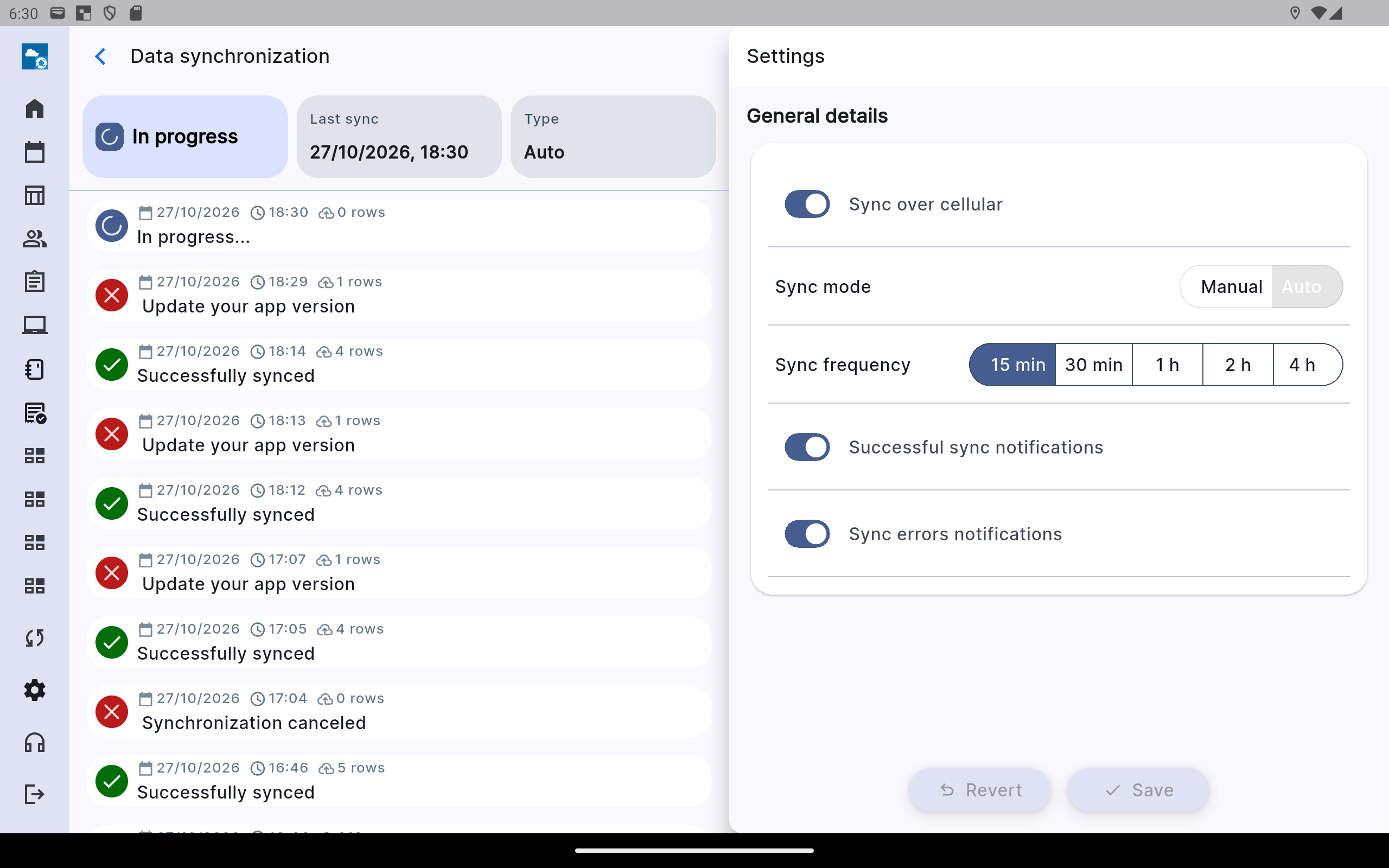
A Settings panel for synchronization configuration is now available in the mobile and tablet apps.

Users can now manage data exchange with the CRM themselves:

  • Sync frequency — select a synchronization interval: 15 or 30 minutes, or 1, 2, or 4 hours;
  • Sync over cellular — allow synchronization over mobile data;
  • Sync mode — manage the synchronization mode according to the permissions granted (manually or automatically);
  • Successful sync notifications / Sync errors notifications — configure system notifications for successful synchronization and errors separately.

The availability of individual settings depends on the permissions configured by the administrator.

The Data synchronization section displays the current status, time, and type of the most recent synchronization, along with an operation history showing outcomes and the number of records processed.

Users can also start synchronization manually through Sync now when needed.

When there is no internet connection, changes made offline are stored on the device and sent to the CRM during the next synchronization after connectivity is restored.

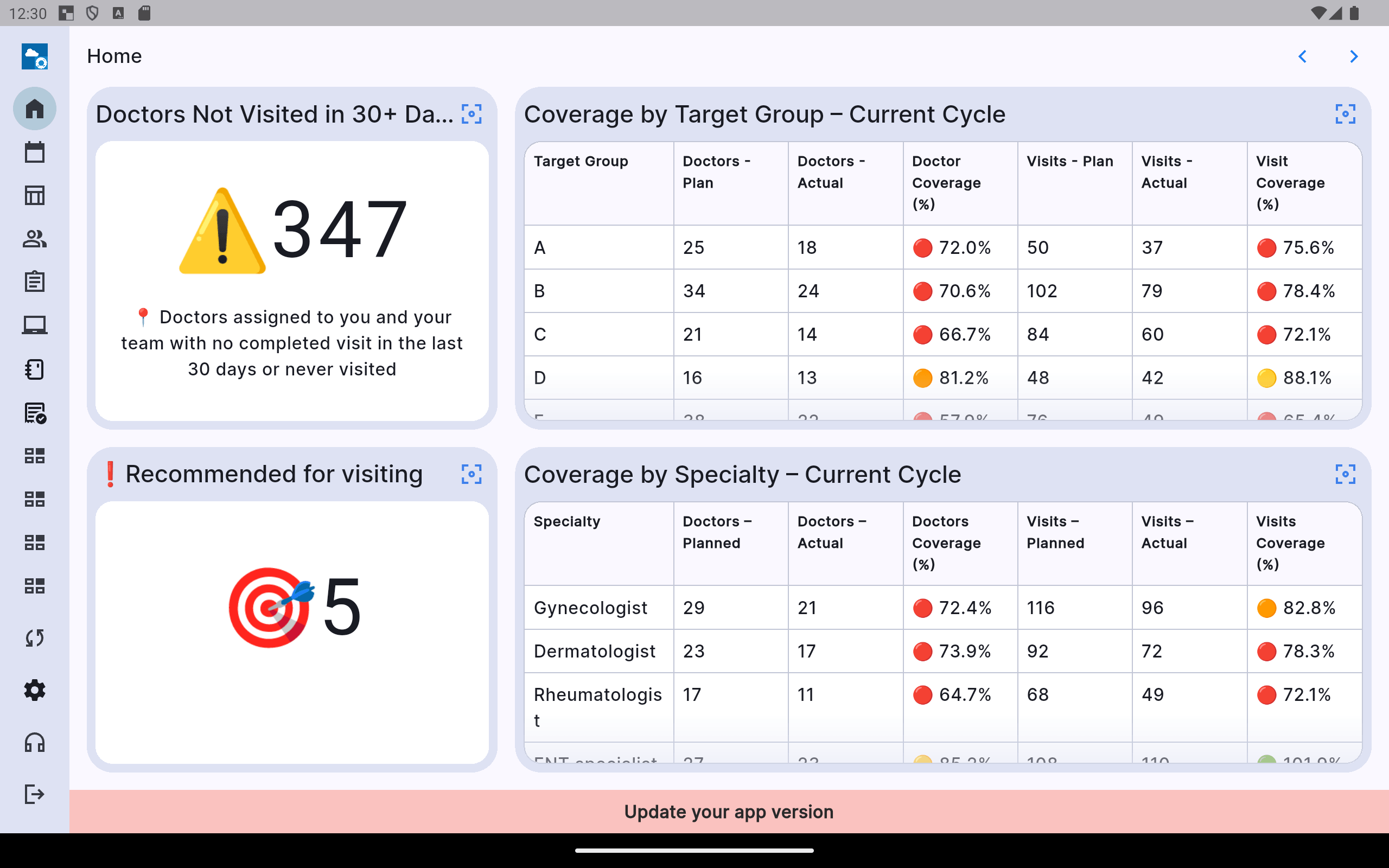
Proxima Cloud CRM now automatically notifies users when a new version is available directly in the app.

In the Data synchronization log, Proxima Cloud CRM displays the Update your app version message before synchronizing data, without blocking the synchronization process.

What Do Users Get? Medical representatives can better monitor how up to date the data on their devices is, start synchronization themselves before the workday or after completing visits, and review the data exchange history.

Notifications help users respond promptly to synchronization errors, learn when new features are available, and keep their software up to date without having to check for new releases manually.

Налаштування синхронізації та журнал Data synchronization у Proxima Cloud CRM.
Screenshot 1: Synchronization settings and the Data synchronization log in the tablet app.
Сповіщення про доступність нової версії застосунку Proxima Cloud CRM.
Screenshot 2: Notification about the need to update the app on the Proxima Cloud CRM home screen.
1.1.2. What's New in GeoForce: Advanced Balancing and Custom Map Layers

Release v19.0 adds GeoForce capabilities for working with a company’s own geographic data and medical representatives’ territories.

Users can now:

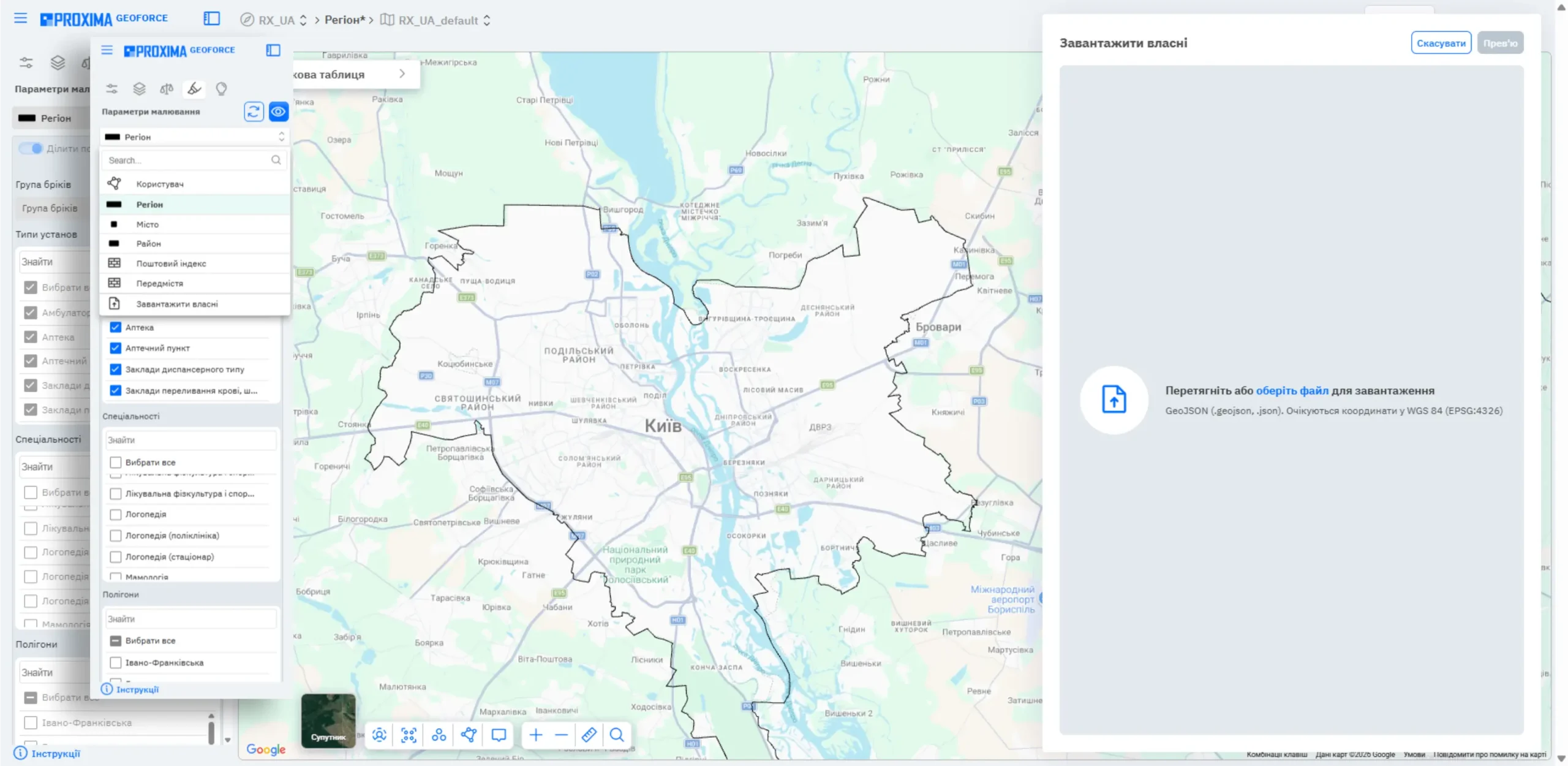
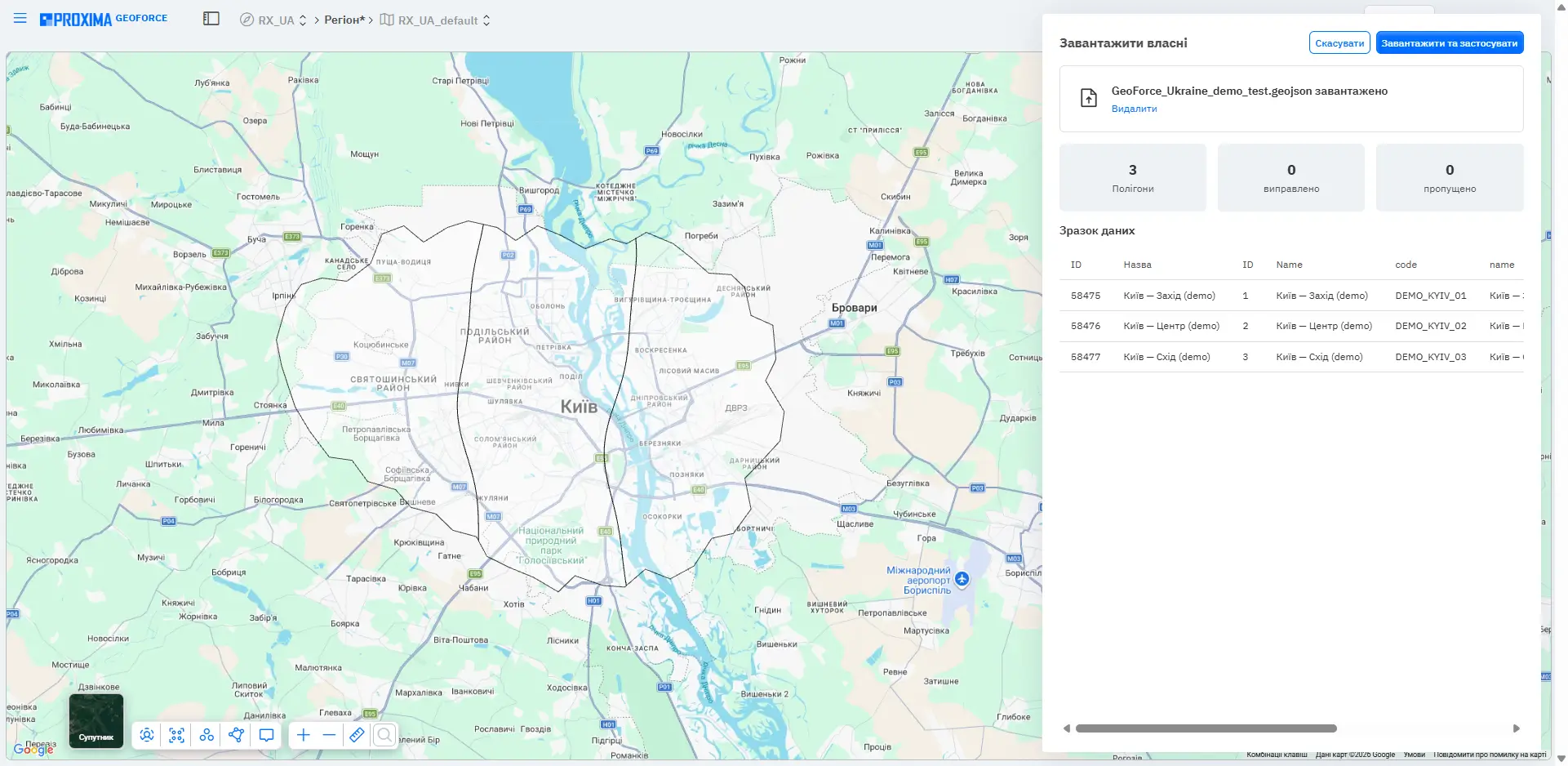
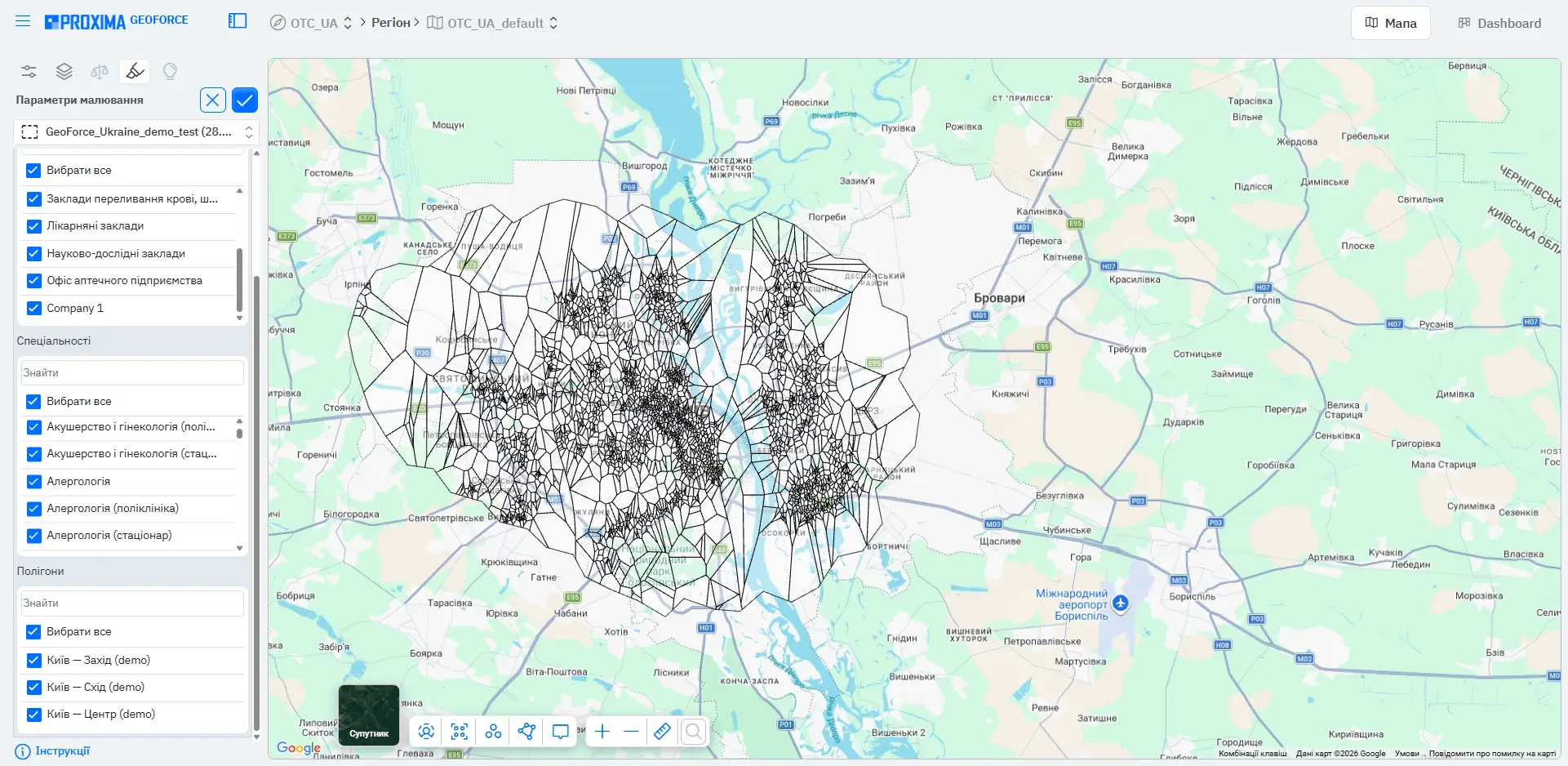
  • upload their own geographic data in GeoJSON files to GeoForce;
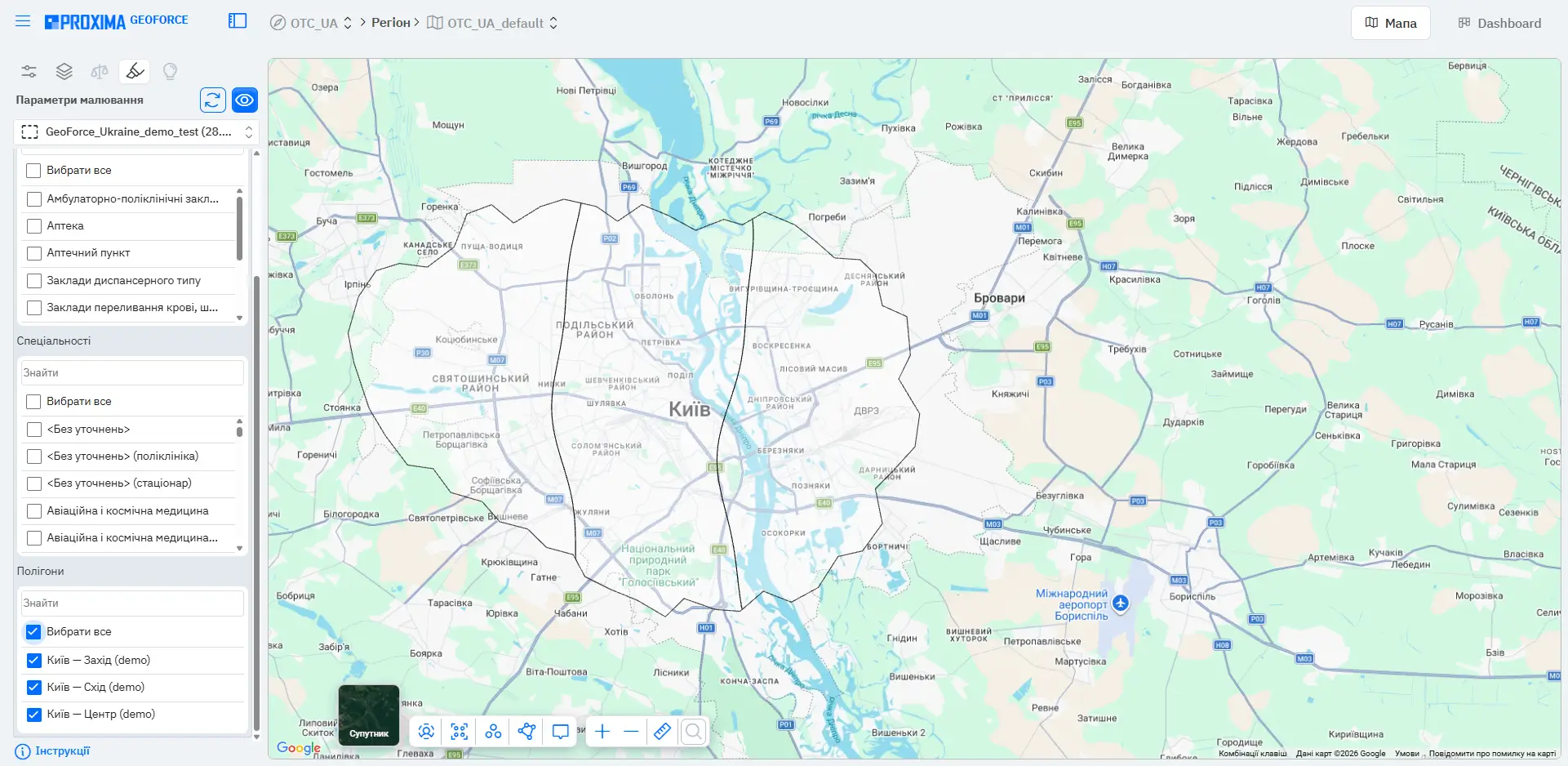
  • use this geographic data as custom map layers;
  • validate and preview the data on the map;
  • create and reuse Voronoi polygons on imported layers;
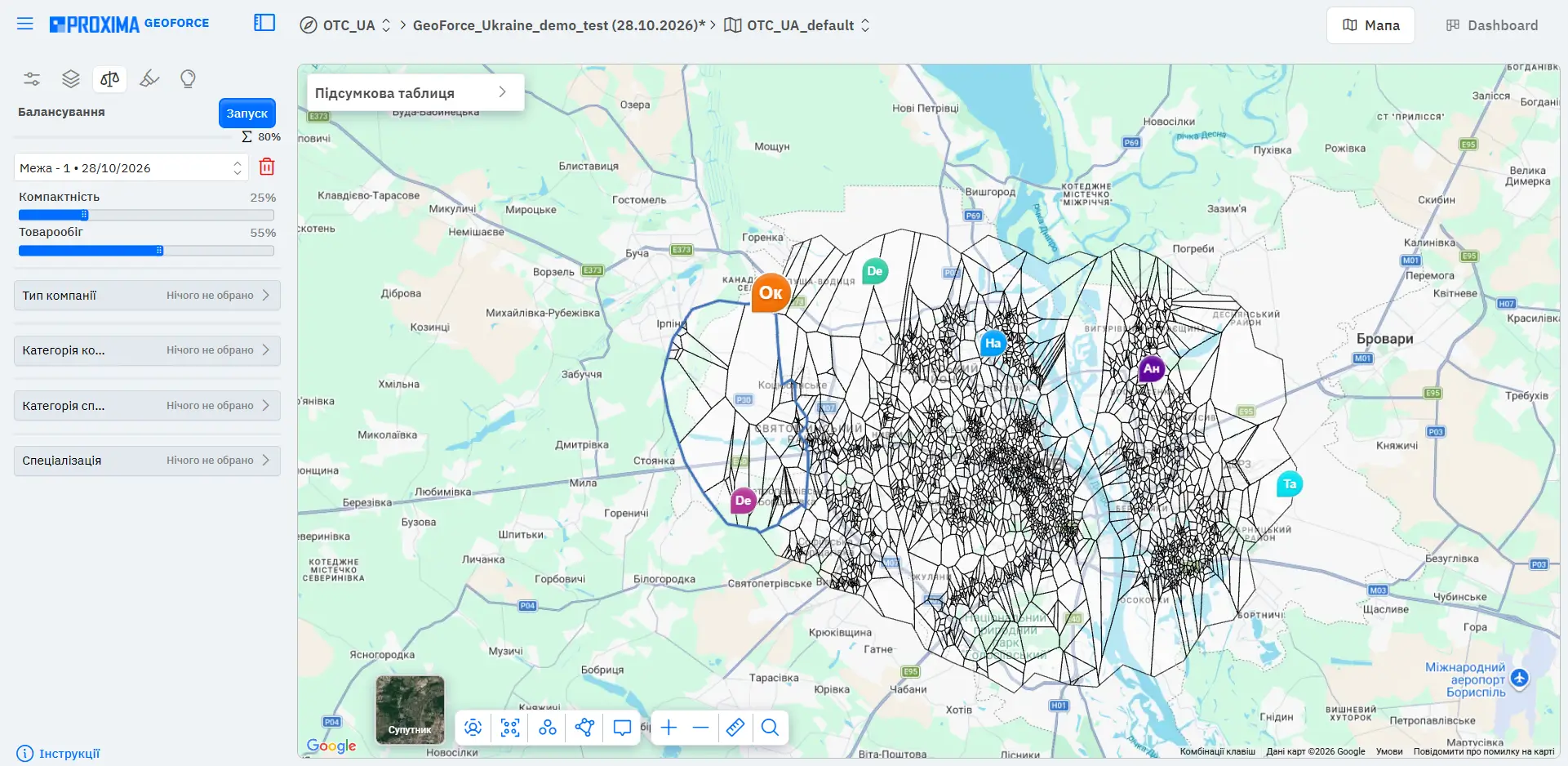
  • managers can assign newly created territories to representatives based on full-time equivalent (FTE) capacity using the Brush and MultiBrush tools;
  • draw a custom boundary on the map to define an area for territory balancing instead of processing the entire custom geographic layer, and reuse the new boundaries for balancing with different parameters.
GeoForce — попередній перегляд та перевірка GeoJSON-шару перед імпортом.
Screenshots 3–4: GeoForce. Uploading and previewing a custom GeoJSON layer on the map and validating geographic data before import.
GeoForce — користувацький географічний шар із власними межами територій.
Screenshot 5: GeoForce. A custom GeoJSON layer showing geographic territory boundaries.
GeoForce — генерація полігонів Вороного на користувацькому географічному шарі.
Screenshot 6: GeoForce. Result of generating Voronoi polygons on a custom layer.
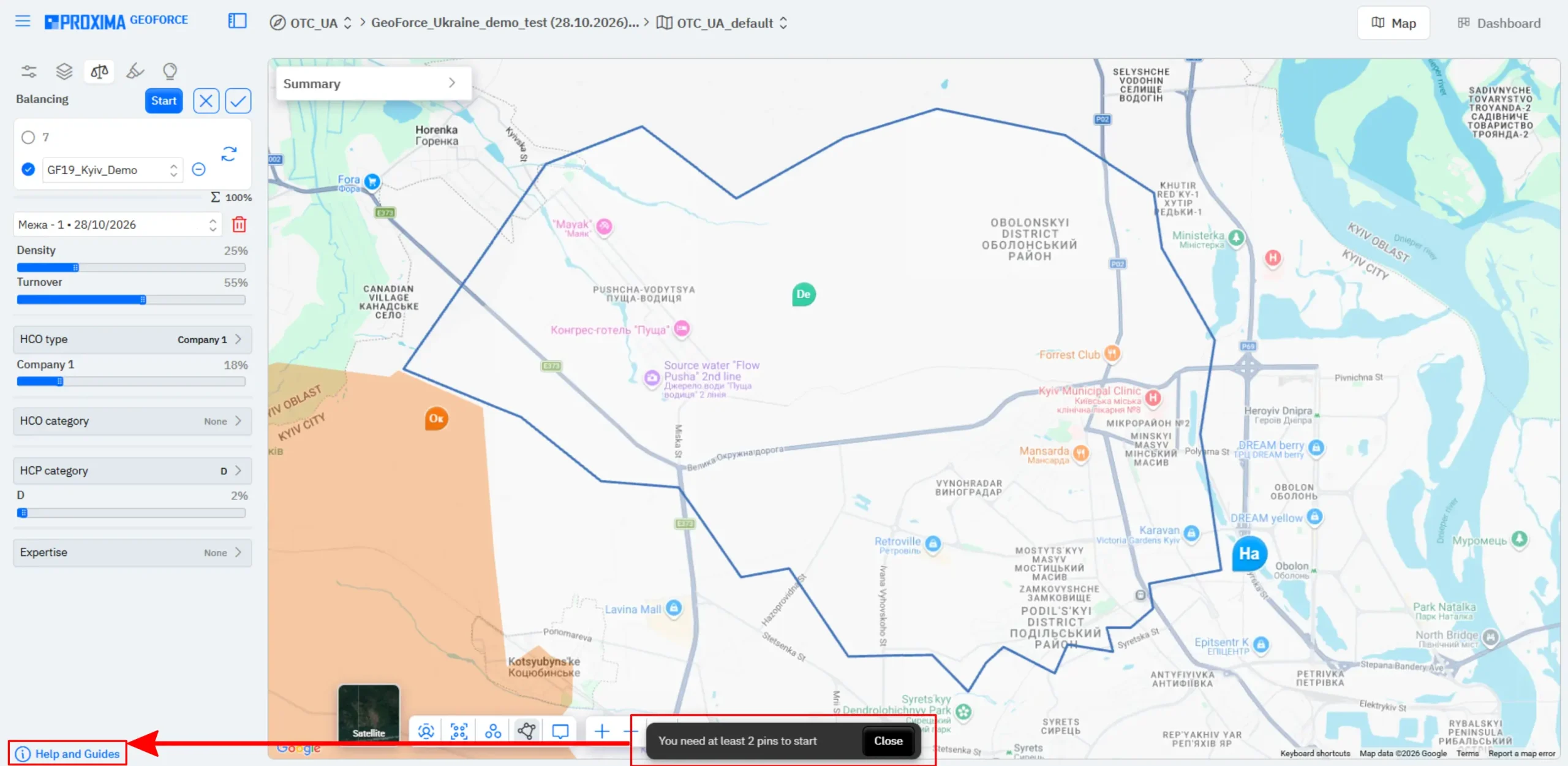
GeoForce — створення власної межі області для балансування територій.
Screenshot 7: GeoForce. Creating and saving a custom boundary to balance a selected area of a geographic layer.

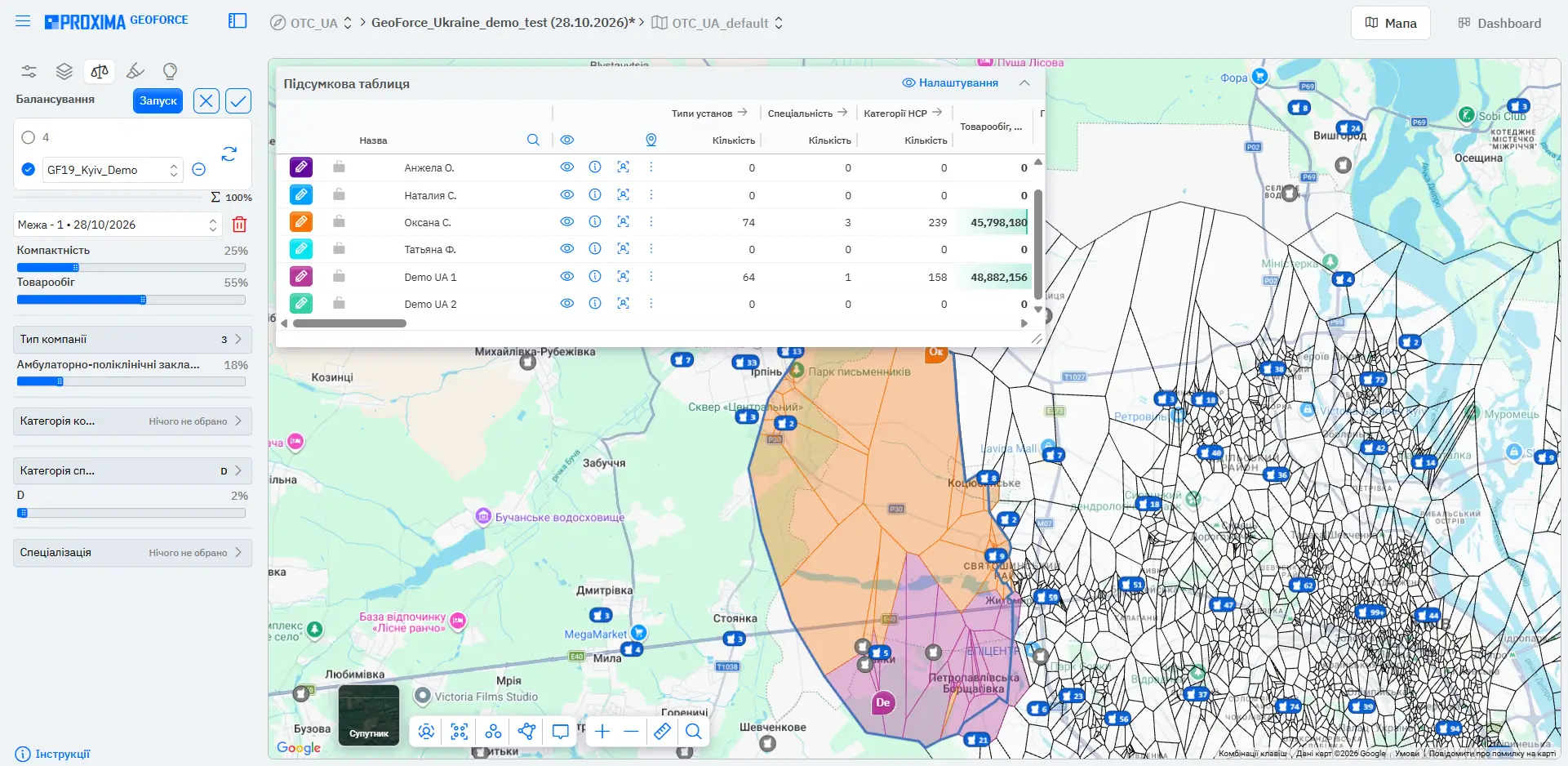
Territory Balancing by Brick Type Has Been Expanded. GeoForce now adds an additional parameter to the final balancing stage — cluster affinity by Brick type. After standard balancing, users can select a Brick type to refine territory allocation by Brick codes, then apply the refined result to the map or reject it in favor of the original balancing option.

GeoForce — уточнення балансування територій за типом Brick та аналіз результатів.
Screenshot 8: GeoForce. Refining territory balancing by Brick type and viewing the results in the summary table.

Benefits for Companies: Field team leaders and territory managers gain more flexibility in building and reallocating territories and can take their company’s own geographic structure and representatives’ workloads into account. This simplifies territory planning, reduces manual work, and helps allocate field team resources more efficiently.

1.1.3. GeoForce Improvements: Map Performance Optimization and Balancing Error Messages

GeoForce map performance has been optimized for large volumes of geographic data. The updated technology enables faster polygon rendering, smoother navigation, and more stable map operation while retaining support for Bricks and heat maps.

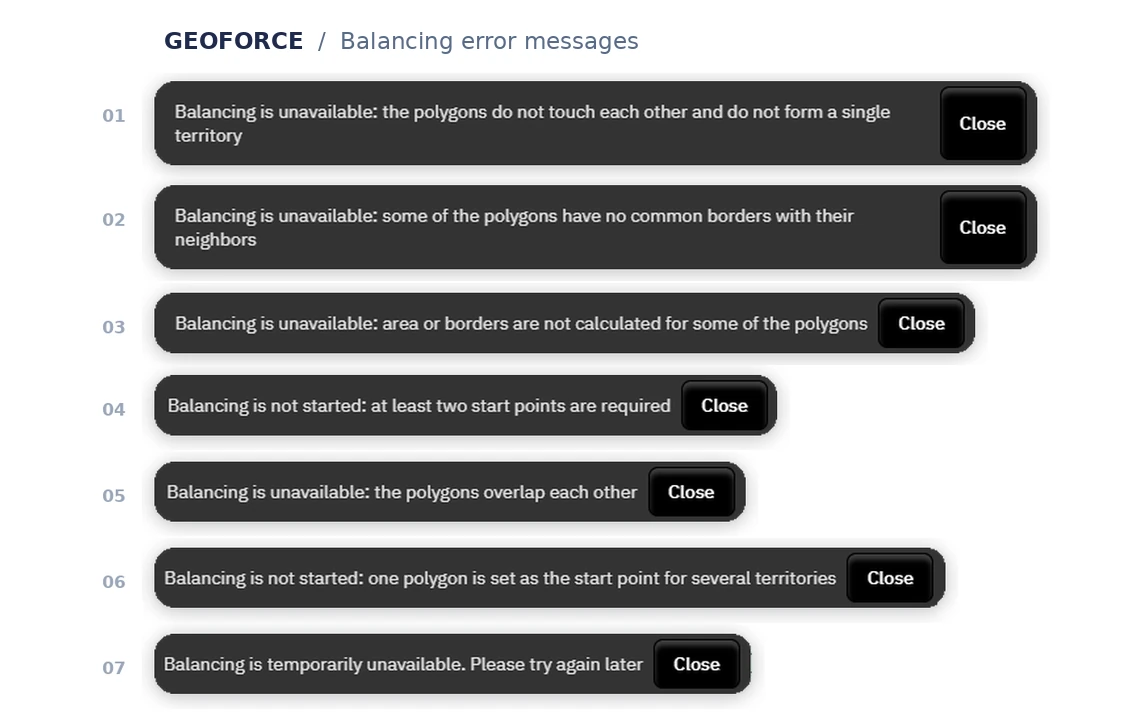
Error messages when starting territory balancing have also been improved. If balancing cannot be started, GeoForce displays a clear message stating the specific reason — for example, a lack of shared boundaries between polygons, overlapping polygons, or incorrectly configured representative starting points.

A link to the documentation on geographic data requirements is now always available in the balancing setup form.

GeoForce — доступ до вимог щодо географічних даних для балансування.
Screenshots 9–10: GeoForce. Examples of messages explaining why territory balancing cannot start and access to documentation.

Territory managers and field team leaders can now work with complex maps more quickly and resolve common balancing setup errors themselves. This reduces territory preparation time and the need to contact CRM administrators or technical support.

1.1.4. What's New in Event Machine and OCM: Easier Mailing Management and Communication Automation

Release v19.0 expands Event Machine capabilities for organizing mailings and interacting with event participants.

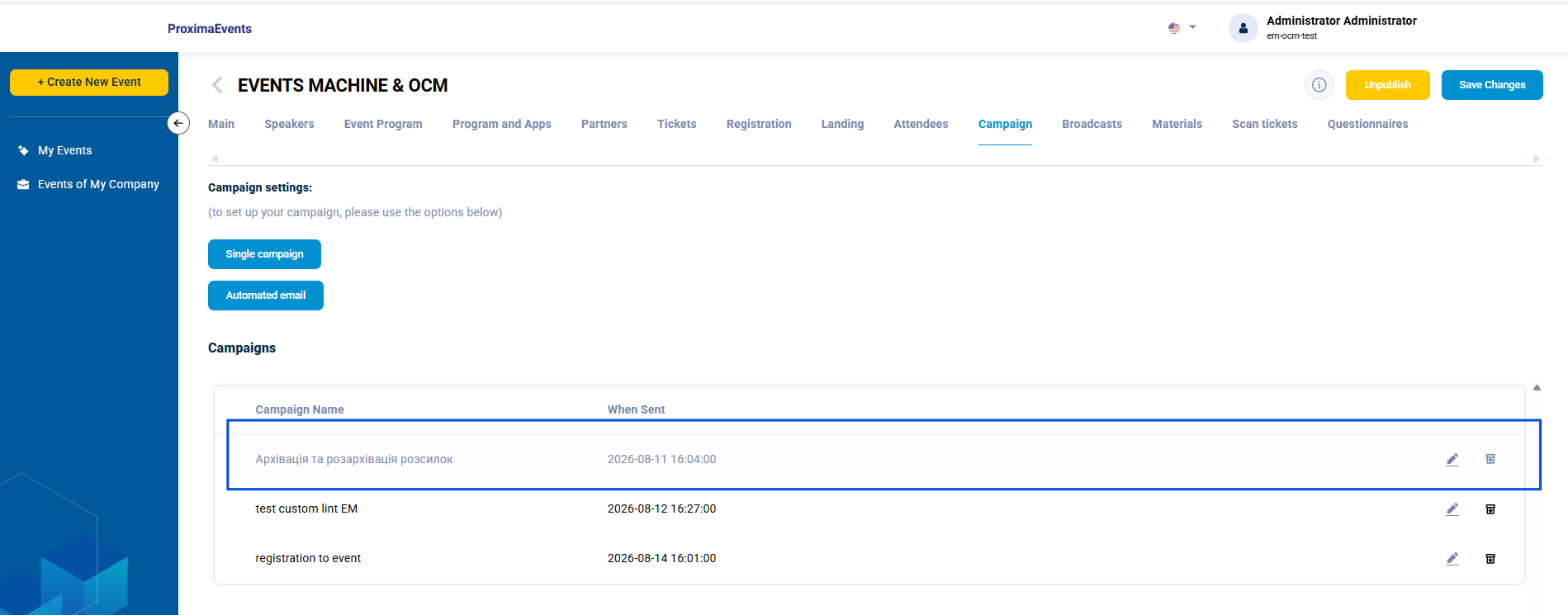
  • Archiving Mailings

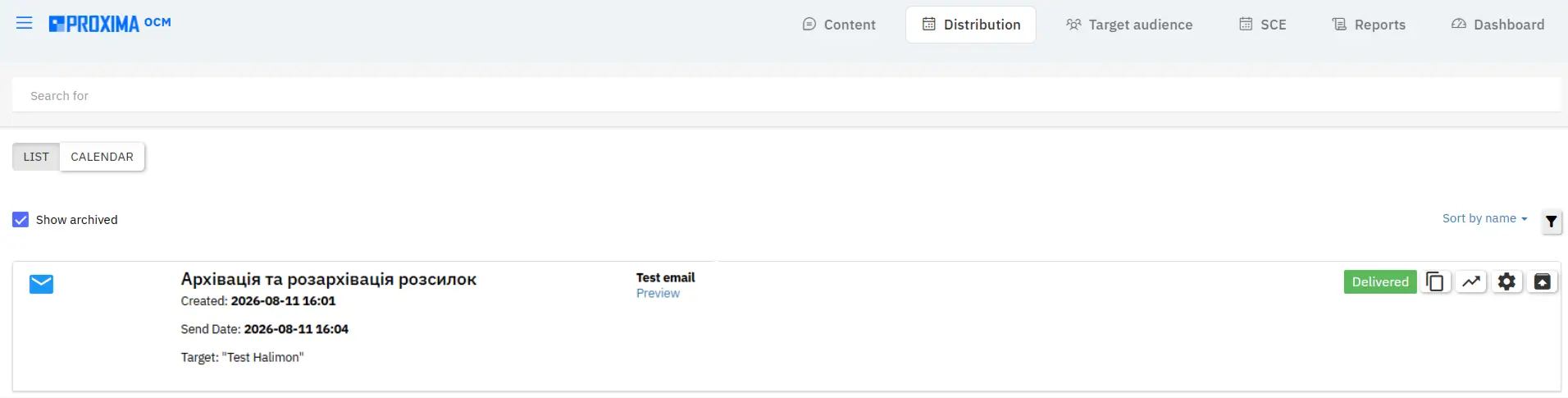
Sent campaigns can now be archived and restored from the archive without being deleted. Archive status is automatically synchronized between Event Machine and Proxima OCM.

This makes it possible to organize completed mailings, preserve their history, and keep information consistent across systems.

OCM — синхронізація статусів архівування розсилок Event Machine.
Screenshots 11–12: Event Machine — list of sent Single Mailing campaigns with the archive action, and synchronization of archive status in OCM.
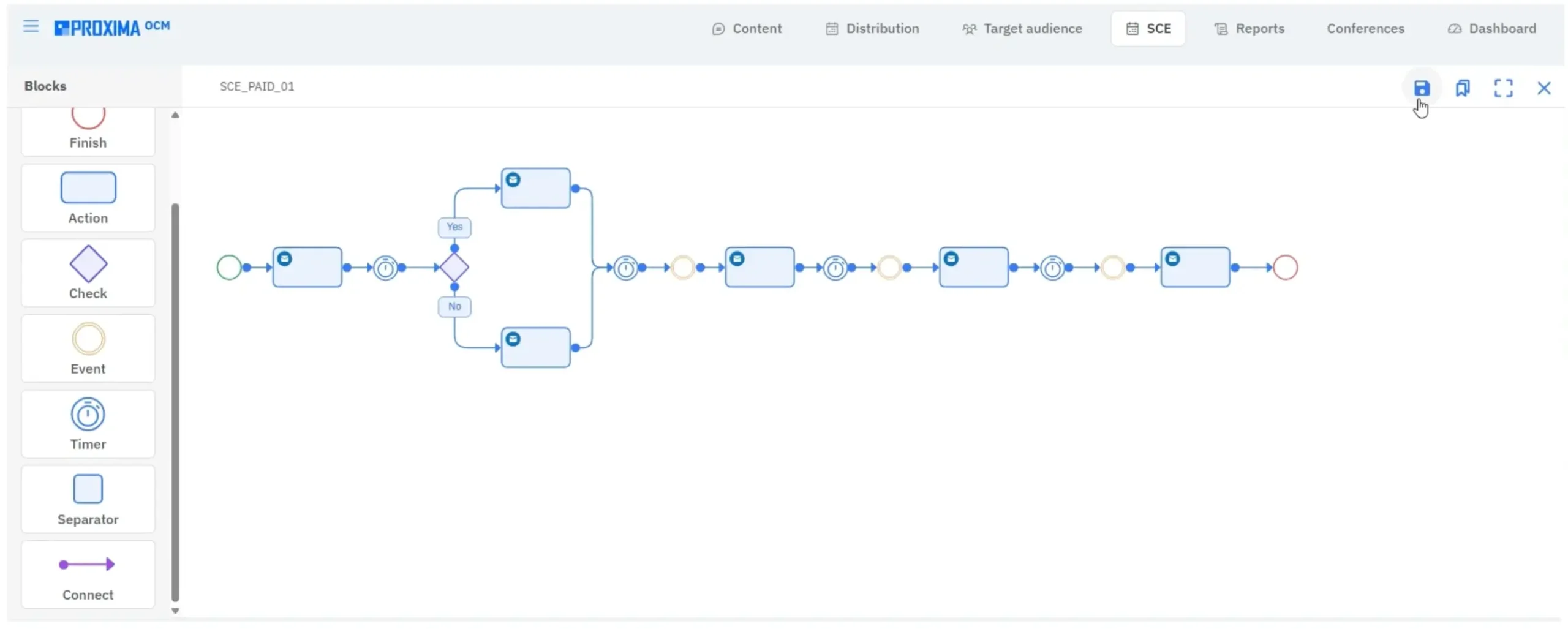
  • Automating SCE Scenarios Based on Participant Status

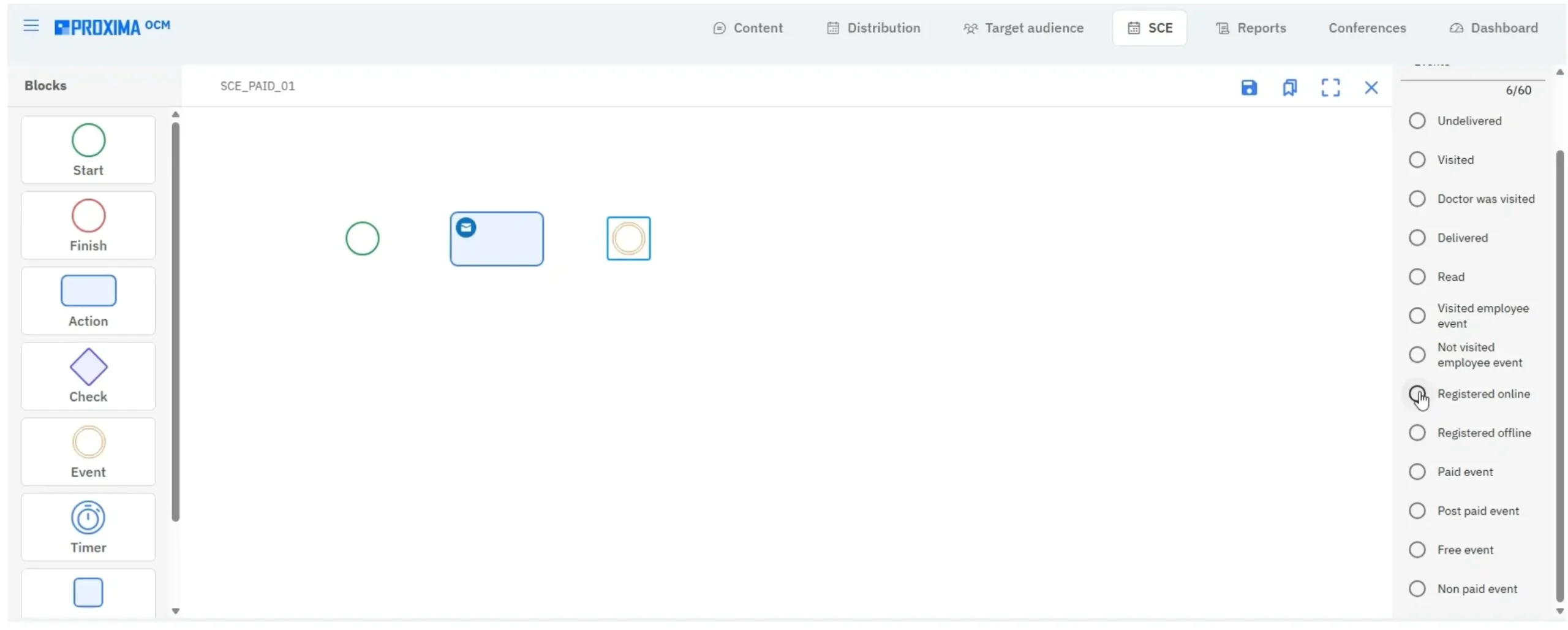
When configuring SCE scenarios, users can now use conference participant statuses in the Event and Check elements.

For example, depending on whether a participant has registered, paid, or attended an event, the system can launch the appropriate communication scenario.

This helps organizers build more targeted communications based on each participant’s stage of engagement and reduces manual work.

SCE — автоматизація комунікацій за статусами учасників подій.
Screenshots 13–14: SCE builder. Selecting a participant status in Event (Registered online, Registered offline, Paid event, Free event) and an example of a status-based scenario.
  • Automatic URL Shortening for Event Machine

Link shortening is now also available for Event Machine. Event links can be shortened automatically for easier distribution and click tracking in supported OCM content.

1.1.5. Improved Search in Event Machine Lists

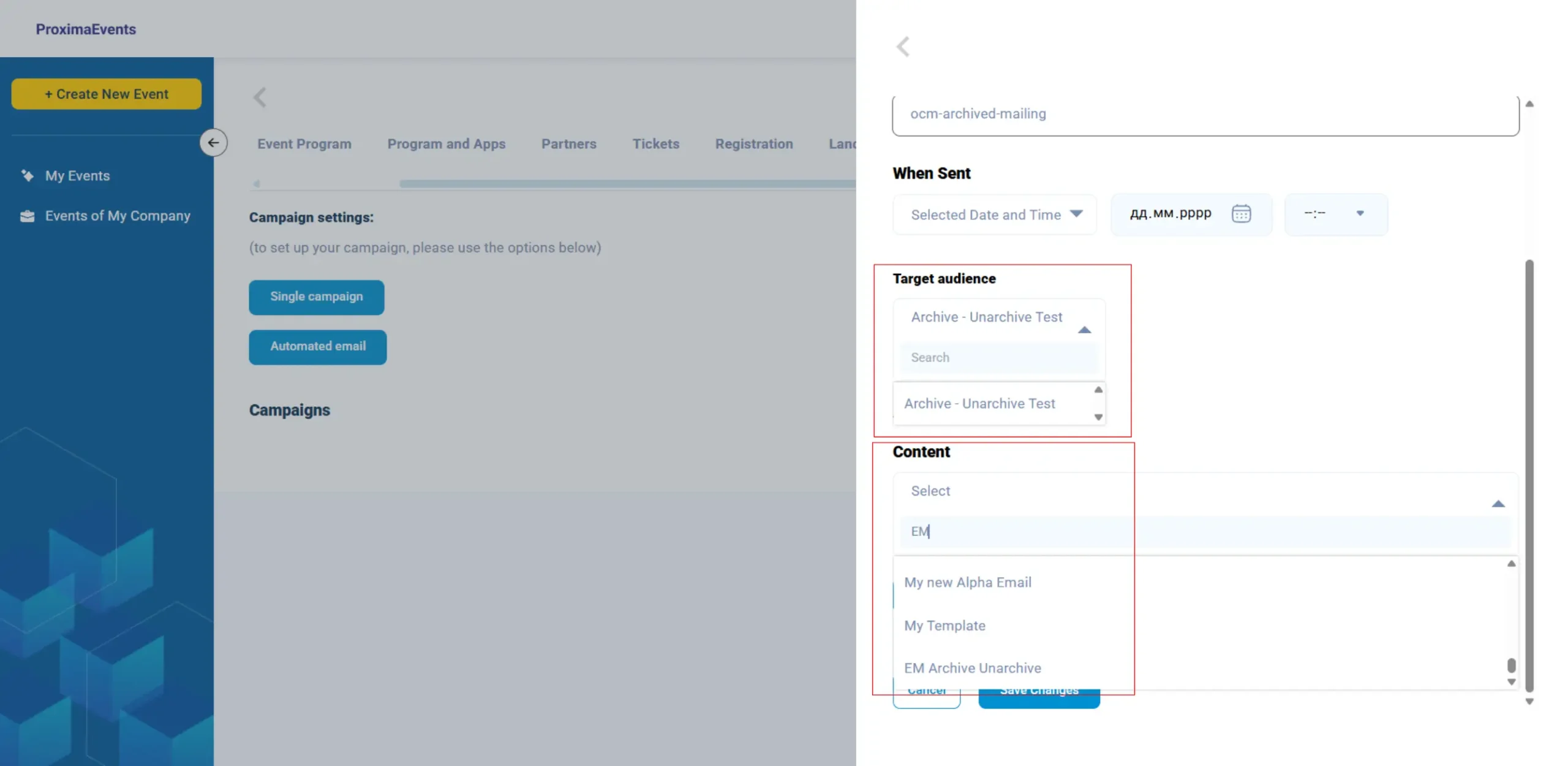
Event Machine dropdown lists now support quick searches for values using part of a name.

Users no longer need to scroll through long lists manually. This speeds up campaign and event setup and reduces the likelihood of selecting the wrong values.

Event Machine — пошук у списках Target audience та Content.
Screenshot 15: Event Machine — searching the Target audience and Content dropdown lists when configuring a mailing.
1.1.6. Working With HCPs and Group Visits: New Features and Improvements
  • Group Visits: Individual Sample Consents and Material Distribution

Sample and material handling within a single group visit has been improved:

– Individual consents for receiving samples. A user can distribute samples to several participants and document each recipient’s individual consent, maintaining the connection between the participant, the samples provided, and their confirmation.

– Distributing the same materials to several participants. The same configured material can be provided to the primary customer and additional visit participants. Existing quantity limits and inventory restrictions remain in effect.

For medical representatives, this simplifies group visit documentation; for companies, it enables more accurate tracking of samples and materials distributed and consents obtained.


  • Product-Level Prescription Planning by SKU

Prescription planning data now supports planned values for individual SKUs for specific HCPs.

Product information is included in the relevant planning data and synchronized with users’ devices.

This provides managers with more granular reporting for individual products.

1.1.7. Pharm Ordering Now Shows Reasons for Order Rejection

Integration for pharmacy order management has been improved.

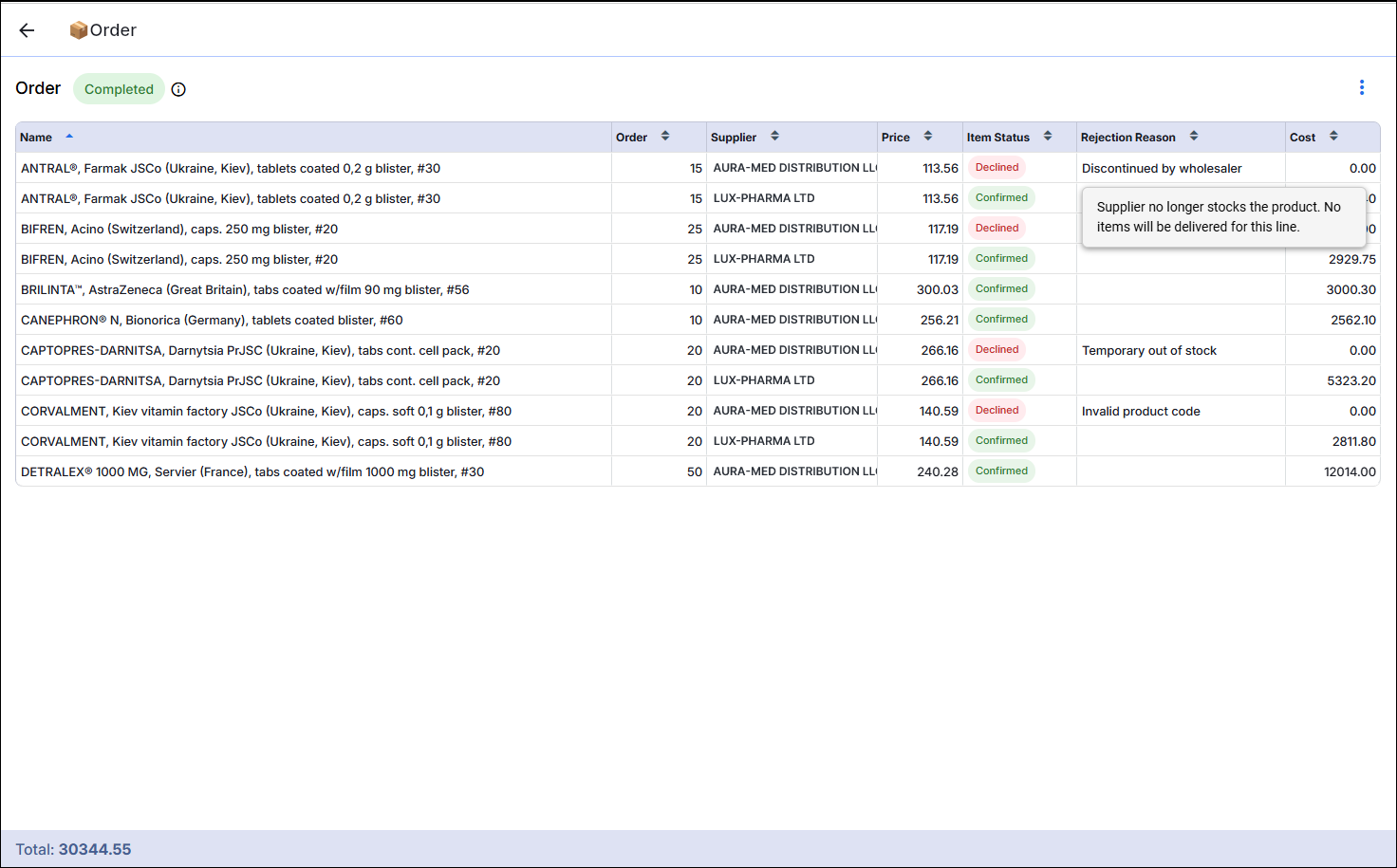
Users can now see the reasons pharmacy orders were rejected and the supplier’s comments. Order data is updated every five minutes.

This helps users determine their next steps more quickly.

Pharm Ordering. Reasons for Order Rejections
Screenshot 16: An example of how rejection reasons and the supplier's comments are displayed in a Pharm Ordering order.

List of order rejection reasons and their standardized explanations during a pharmacy visit:

  • Temporary out of stock. This item is currently out of stock at the warehouse and has been backordered from the supplier. No items will be delivered for this order line.
  • Last of stock. Only the final remaining stock will be delivered for this order line.
  • Manufacturer out of stock. No items will be delivered for this order line because the manufacturer currently has no available stock to fulfill the order.
  • Account problem. The account ID is incorrect, so the order cannot be processed. All order lines will receive this rejection code. No items will be delivered for any order line.
  • Cancelled at pharmacy request. The customer has contacted the supplier to cancel the order. No items will be delivered for any order line.
  • Discontinued. No items will be delivered for this order line because the manufacturer has permanently discontinued the product.
  • Invalid product code. The product code provided in the order cannot be matched to the supplier’s product code in the system, or the product code recorded for this supplier is incorrect. No items will be delivered for this order line.
  • Discontinued by wholesaler. The supplier no longer stocks this product. No items will be delivered for this order line.
  • Account on hold. The customer account is valid, but the customer is not permitted to place electronic orders. All order lines will receive this rejection code. No items will be delivered for any order line.

1.2. Proxima CRM Platform

In Release v19.0, the platform gained new capabilities for working with custom objects and managing their synchronization. The primary focus is making data available in the mobile app even without an internet connection.

New Platform Features in v19.0

1.2.1. Custom Object: Offline Synchronization

Proxima Cloud CRM now supports offline synchronization of custom fields and custom objects.

Users can now create, edit, and delete custom object records without internet access.

All changes made are automatically synchronized with the server once connectivity is restored.

This is particularly important for field teams working in areas with unreliable mobile coverage.

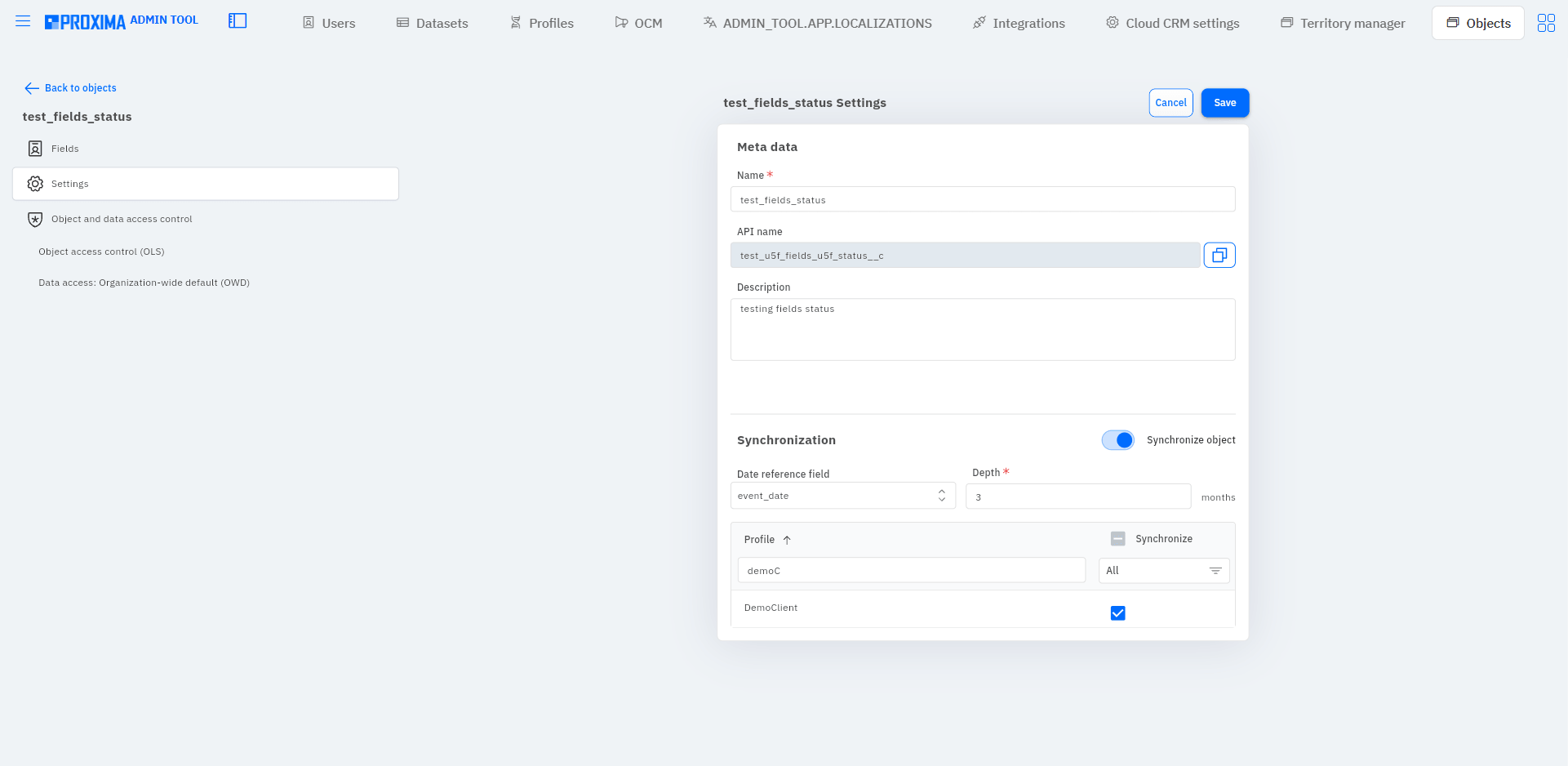
1.2.2. New Custom Object Synchronization Settings

New parameters for managing custom object synchronization have been added for administrators.

Administrators can:

  • define which user roles will receive data from the relevant objects;
  • set the synchronization depth;
  • select the default synchronization mode;
  • allow or prevent users from changing the synchronization mode on their devices.

This enables flexible adaptation of synchronization settings to each company’s workflows.

Admin Tool — налаштування синхронізації кастомних об’єктів CRM.
Screenshot 17: Custom object synchronization settings in Admin Tool: selecting the date field, synchronization depth, and user profiles.

1.3. New CRM Analytics Features in Power BI

Release v19.0 expands CRM analytics capabilities for evaluating team activity, request priorities, and workloads across different types of activities.

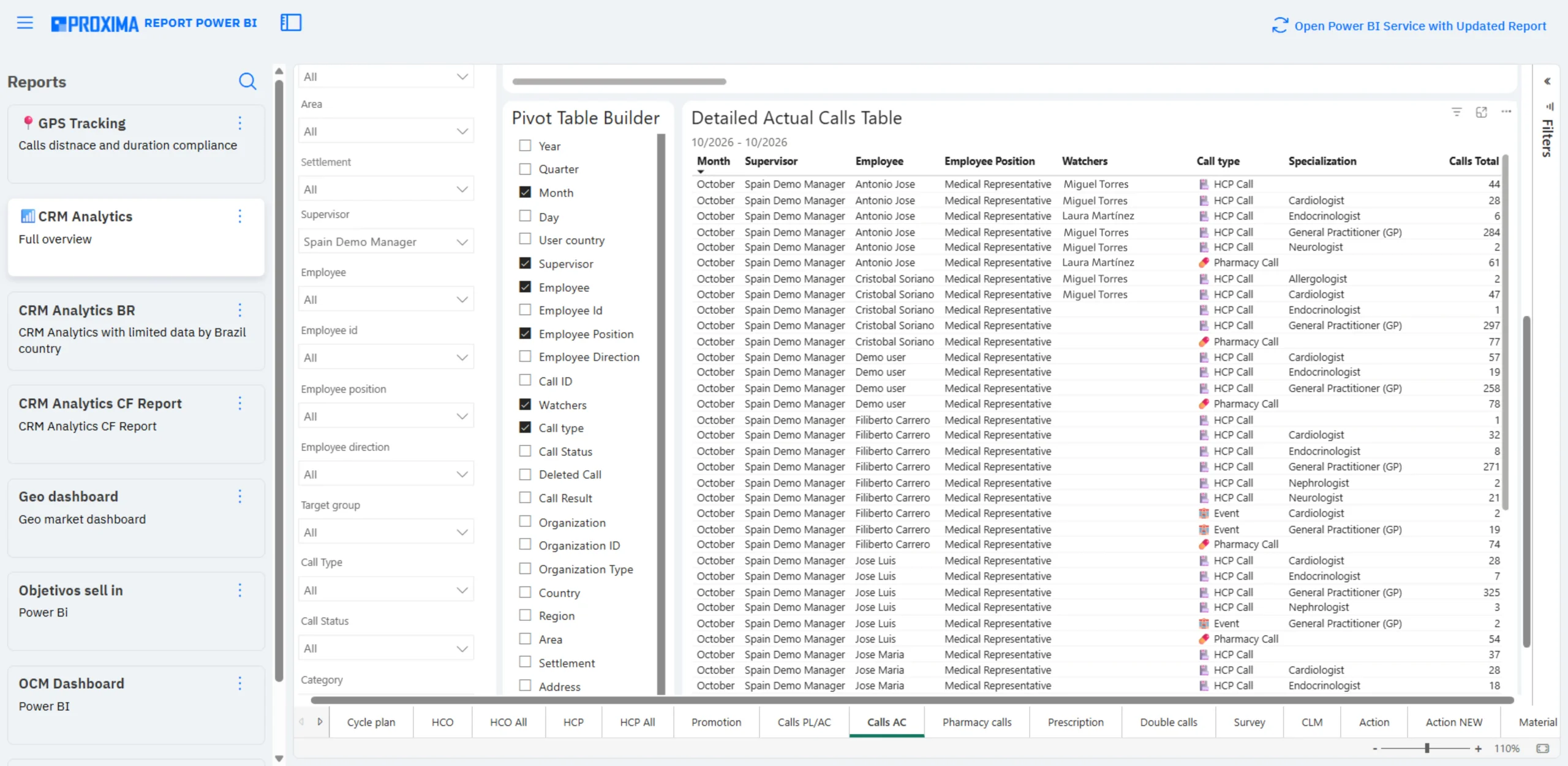
  • Actual Visits — Calls AC: Visit Watchers

The report has been enhanced with an Watchers field, helping reconstruct the picture of team activity and more accurately assess employee involvement in joint visits.

Proxima Cloud CRM — основні учасники та спостерігачі (Watchers) у межах одного візиту.
Screenshot 18: Primary participants and additional Watchers within a single visit.
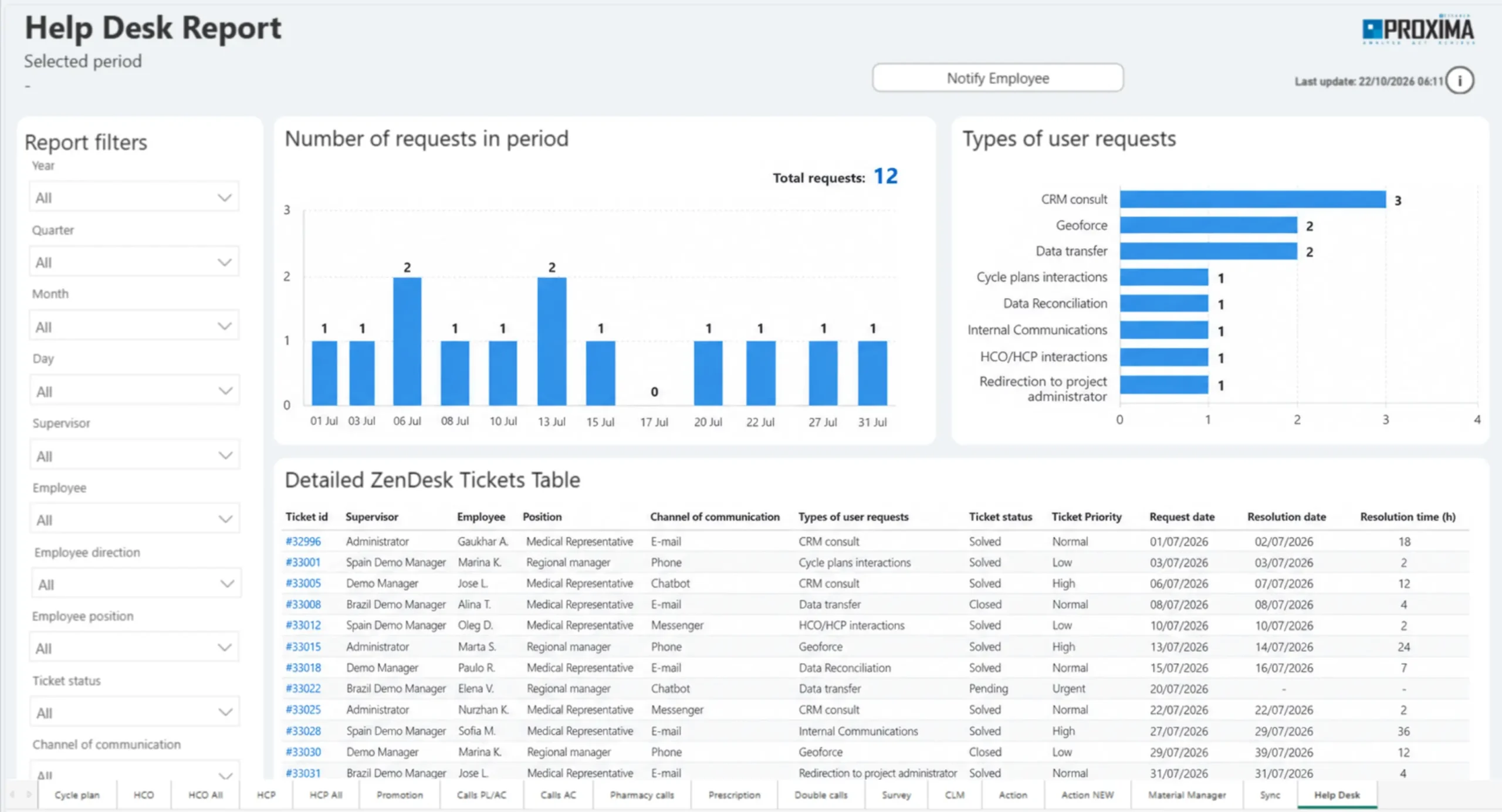
  • Support Report — Help Desk: Focus on Critical Requests

The Help Desk report in Power BI now displays priorities for requests submitted to Proxima Cloud CRM support.

Pharmaceutical company managers can now see not only the statuses and resolution times of their employees’ requests, but also their priority levels — Low, Normal, High, or Urgent.

This helps monitor the handling of the most important issues affecting team operations.

Power BI — звіт Help Desk із пріоритетами звернень Ticket Priority.
Screenshot 19: Help Desk report showing request details and the Ticket Priority field.
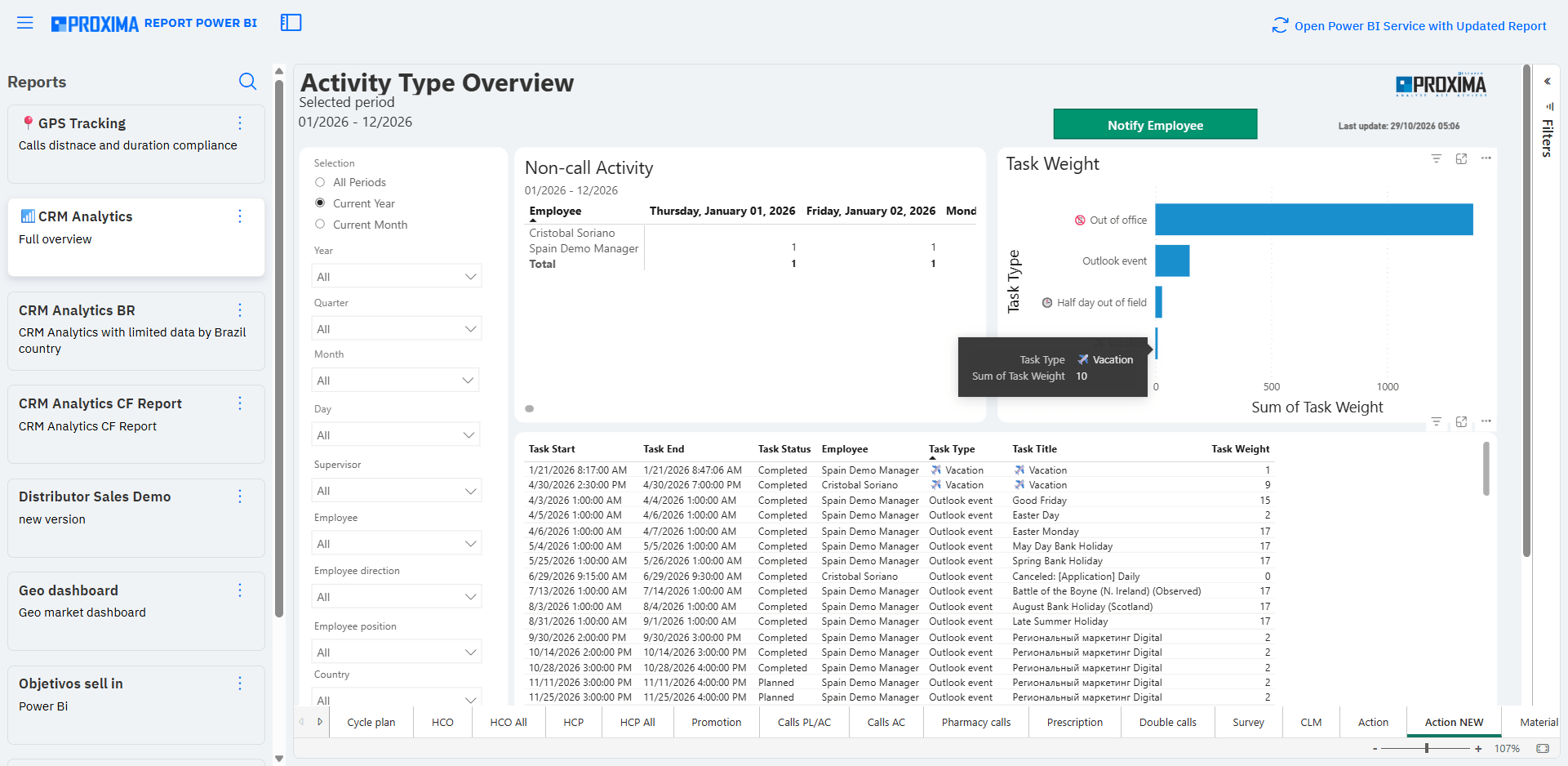
  • Activity Type Overview — Action NEW: Chart of Non-Visit Activities With Tooltips

The Power BI report Action NEW → Activity Type Overview provides analytics on activities unrelated to visits. The Task Weight chart enables comparisons of activity types based on the total value of their weighted metrics.

Hovering over a chart element displays an interactive tooltip with the activity type and total value.

Power BI — Activity Type Overview: діаграма Task Weight з інтерактивними підказками.
Screenshot 20: Power BI → Action NEW → Activity Type Overview. Task Weight chart with an interactive tooltip.

Benefits for Managers and Leaders: More information about different aspects of team performance within a single analytics environment.

2. Release v19.1 — September 24, 2026

Release Proxima Cloud CRM v19.1 Infographics

2.1. Proxima CRM Product — GeoForce

Release v19.1 continues the development of GeoForce territory planning tools.The update focuses on simplifying geographic data management, enabling more precise balancing criteria, and improving managers' productivity when working with maps.

New Product Features in v19.1

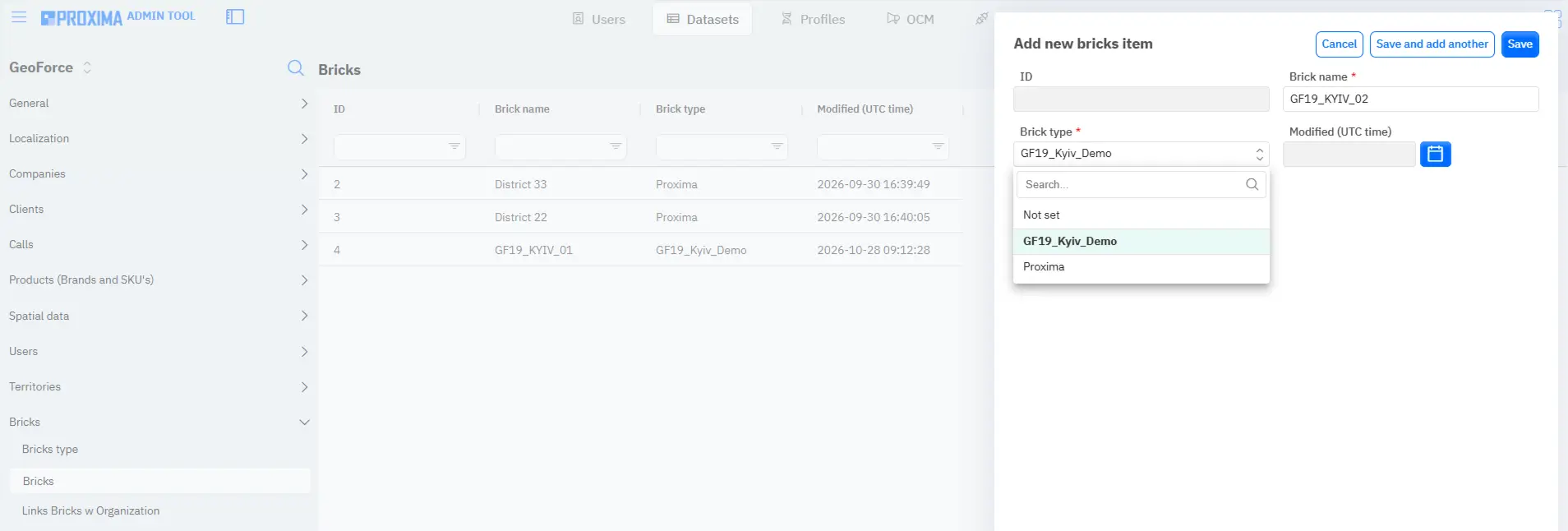
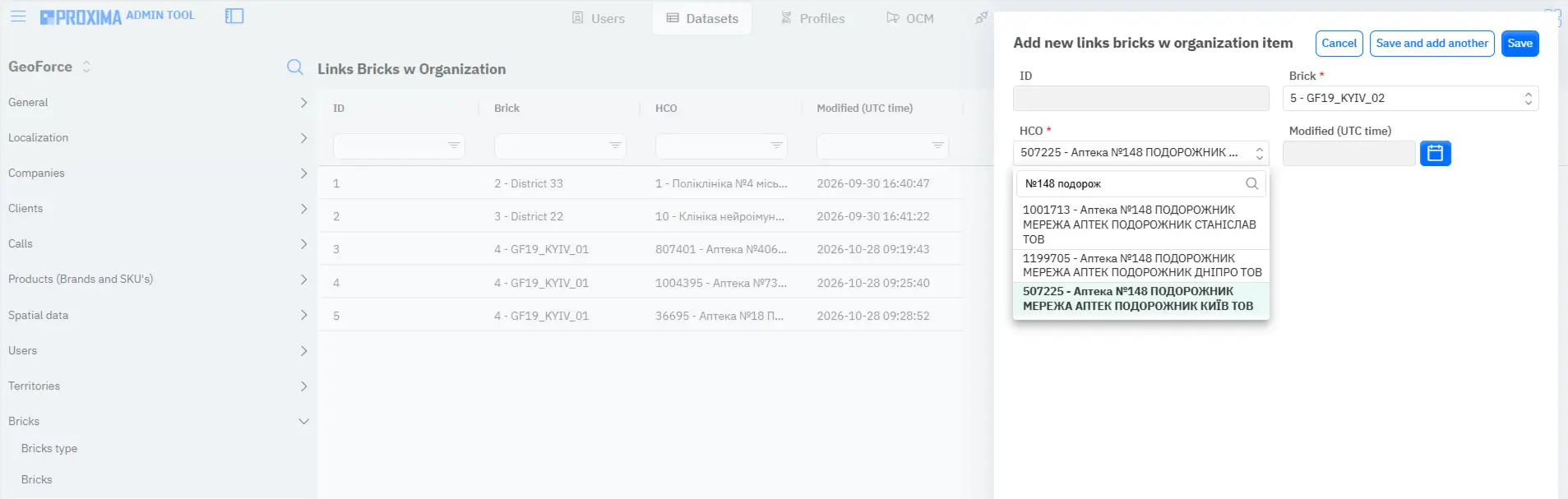
2.1.1. Self-Service Bricks Management Through Datasets

Administrators can now independently upload, view, and update geographic Bricks data through Datasets in Admin Tool.

Separate datasets are provided for management:

  • Bricks type;
  • Bricks;
  • Links Bricks w Organization.

Administrators now have greater independence in managing geographic structures, reducing the need to submit technical requests.

GeoForce — створення Bricks та налаштування Brick Types в Admin Tool → Datasets.
Screenshot 21: Admin Tool → Datasets → GeoForce: creating Bricks and specifying their types.
GeoForce — налаштування зв’язків між Bricks та організаціями (HCO).
Screenshot 22: Admin Tool → Datasets → GeoForce: configuring links between Bricks and organizations (HCOs).

The configured data can be used to refine territory balancing in GeoForce.

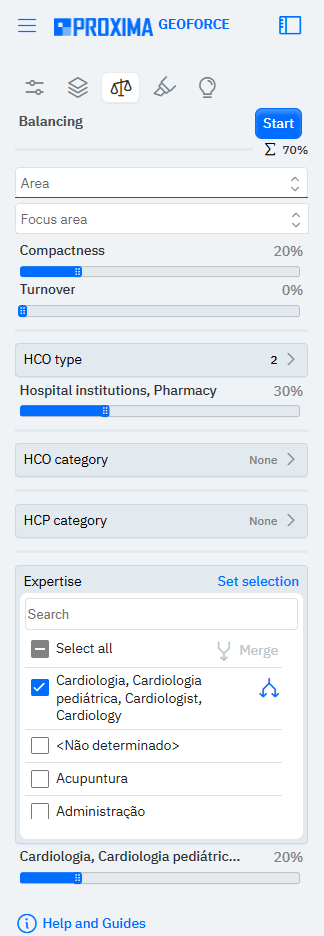
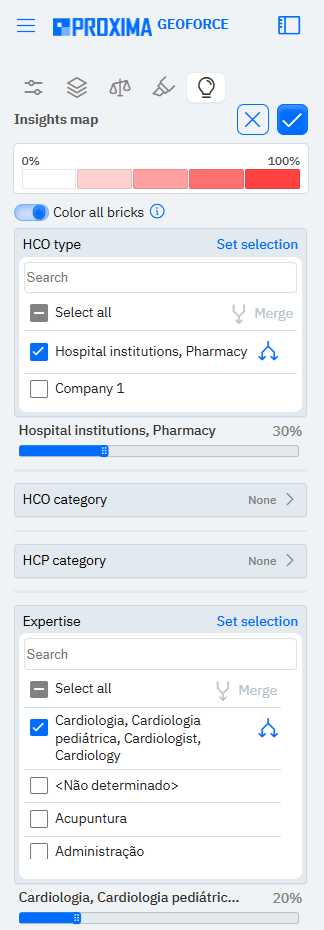
2.1.2. Grouped Territory Balancing Criteria

GeoForce now allows related medical specialties or organization types to be combined into groups with a shared weight.

For example, inpatient and outpatient cardiologists can be considered one group. Pharmacies and pharmacy outlets can be grouped in the same way.

Specialty and organization-type grouping is available both in territory balancing settings (Balancing) and in the map-based metrics analysis tool (Insights map). Users can combine several criteria into one group and assign it a single weight, simplifying work with complex datasets.

For managers, this means more flexible territory allocation based on the structure of the customer base and the selected weights of individual groups.

Screenshots 23–24: Configuring grouped criteria: an example of combining two specialties or organization types with a shared weight in Balancing and Insights map.

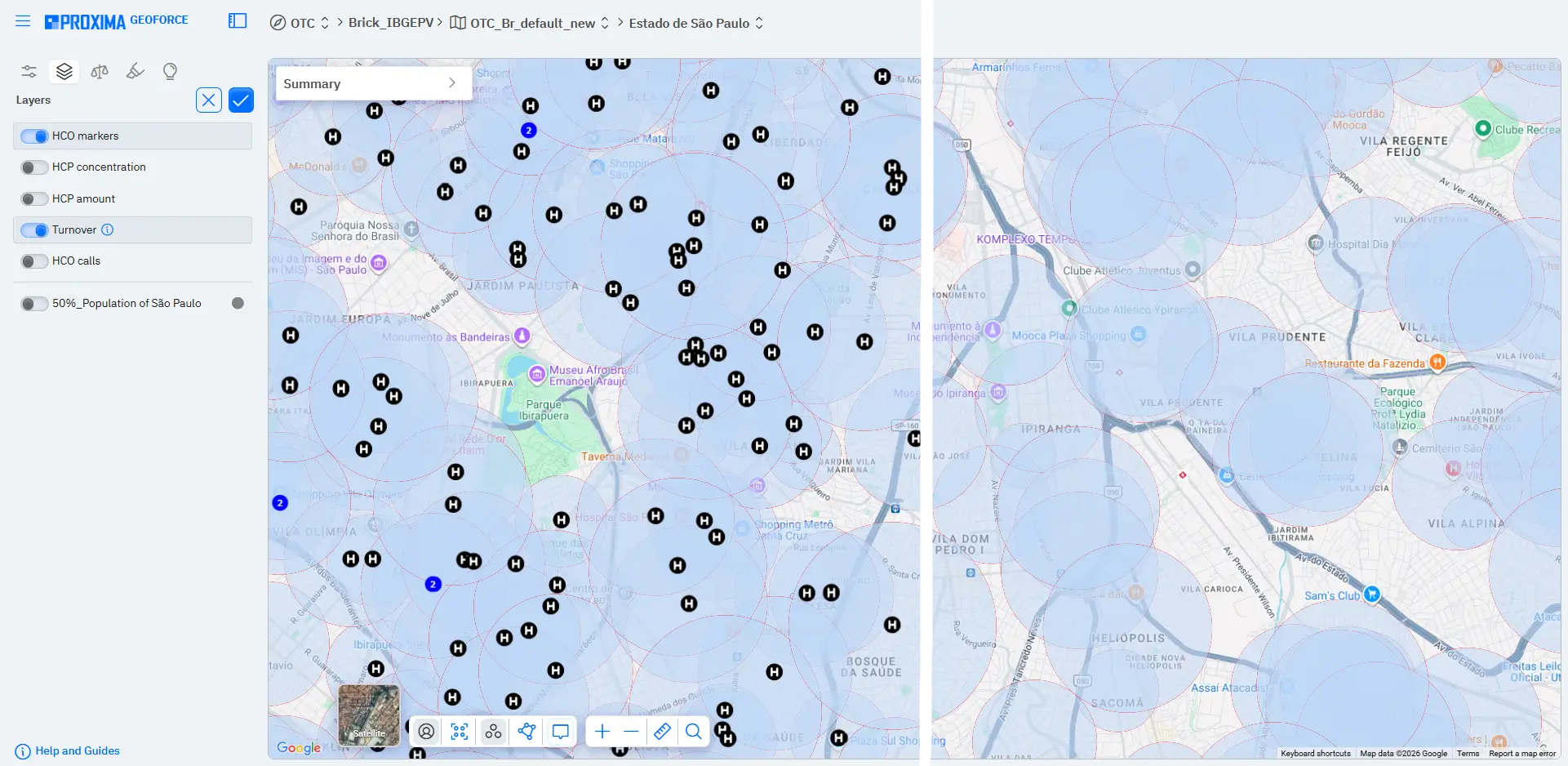
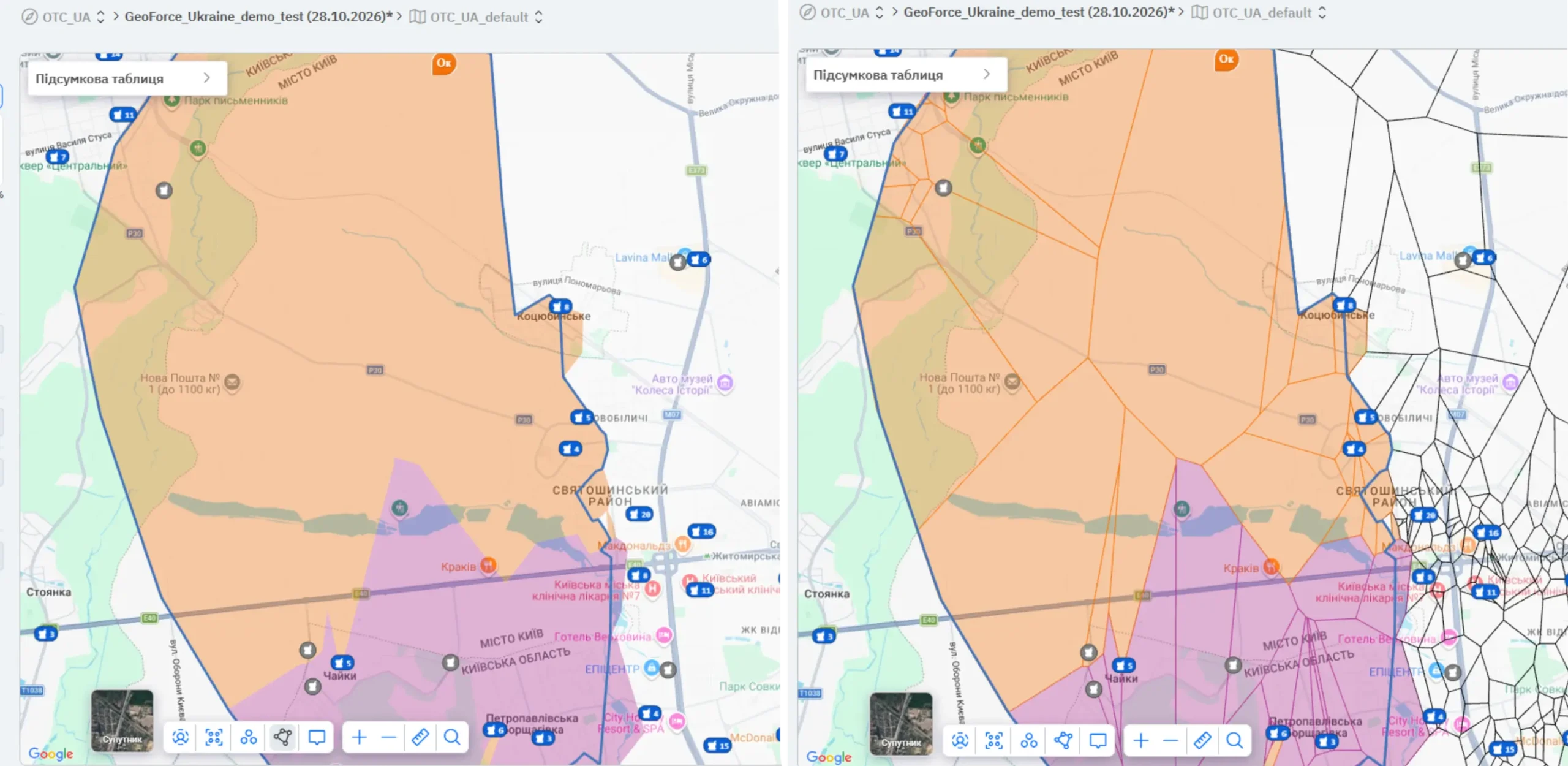
2.1.3. Visualizing Market Potential Without Unnecessary Markers

In the Layers panel, users can now disable organization markers while keeping turnover bubble markers visible on the map.

The bubbles have become more contrasting, and their minimum size has been optimized for better visibility.

This makes it possible to view territories’ market potential without overloading the map with large numbers of organization markers.

Managers can more easily assess the geographic distribution of turnover and use this data in territory analysis.

GeoForce — візуалізація товарообігу без маркерів організацій на карті.
Screenshot 25: The same territory at the same scale: organization and turnover markers on the left, and only turnover bubble markers on the right.
2.1.4. Controlling Polygon Boundary Visibility

A new Polygon Outlines Toggle button on the map toolbar lets users show or hide polygon boundaries.

Hiding boundaries reduces visual clutter and noticeably speeds up work with dense territories containing thousands of polygons.

GeoForce — керування видимістю меж полігонів через Polygon Outlines Toggle.
Screenshot 26: Polygon Outlines Toggle — comparison of maps with hidden and visible polygon boundaries.

This is particularly useful when working with large geographic datasets, allowing users to focus on map data rather than the detailed rendering of every boundary.

Product Improvements in v19.1

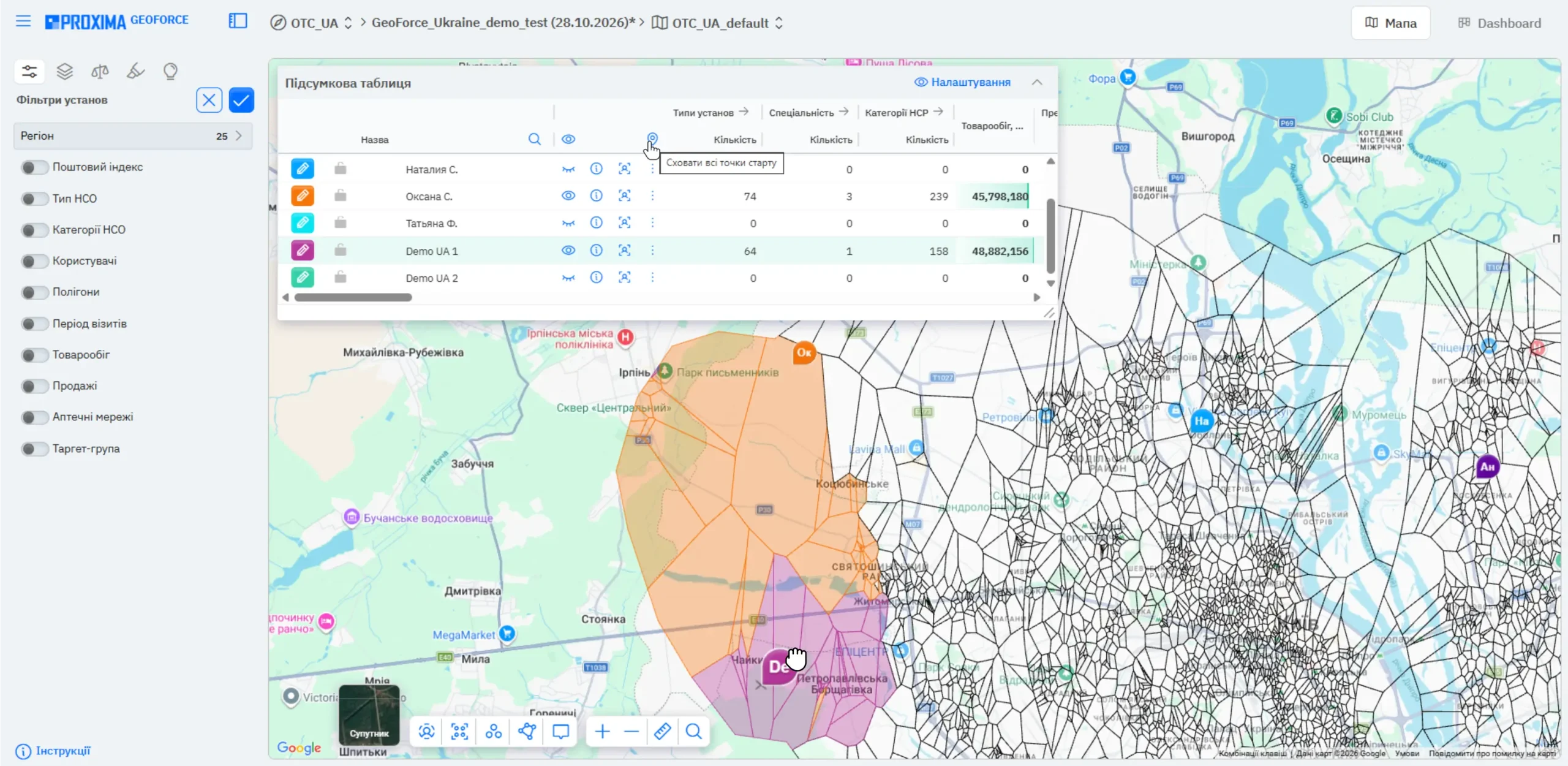
2.1.5. Easier Management of Medical Representatives' Starting Points

GeoForce makes it easier to work with medical representatives’ starting points.

The following options are now available:

  • Direct placement — placing a marker next to a representative immediately assigns a starting point without additional confirmation or shifting the map’s center.
  • Drag and drop — existing starting points can be moved directly on the map.
  • Show all or hide all — a toggle above the representative list lets users show or hide all starting points at once.
  • Active pin highlight — the selected marker becomes larger and the corresponding representative is highlighted in the list.

These changes make starting point management faster, simplify adjustments, and help managers navigate the map more easily.

GeoForce — керування стартовими точками медичних представників на карті.
Screenshot 27: GeoForce. Starting point management — highlighting the active marker and corresponding medical representative in the summary table, dragging a point, and using the button to hide all markers.
2.1.6. More Workspace and Easier Map Navigation

Release v19.1 improves several elements of the GeoForce interface.

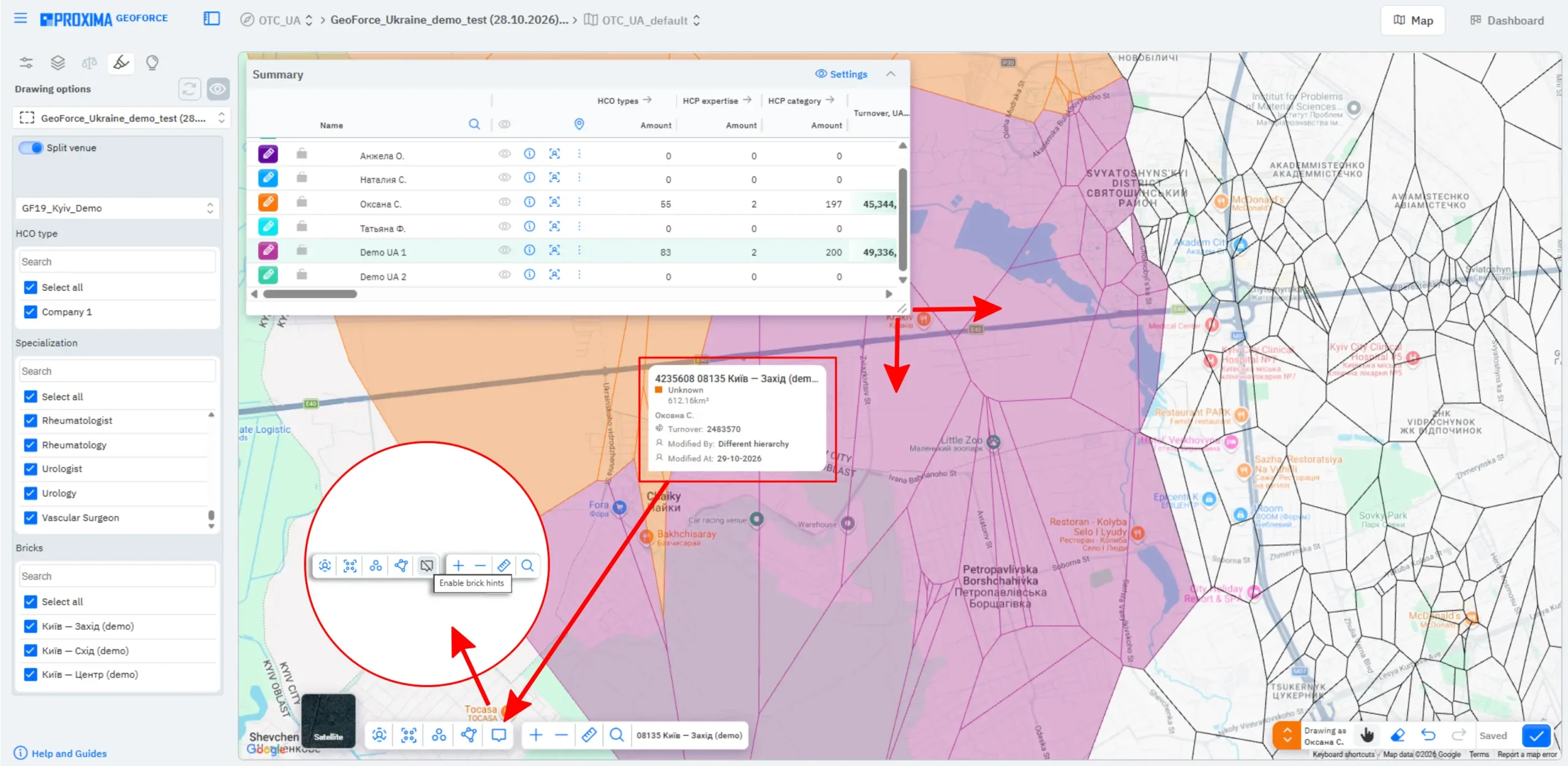
  • Controlling Polygon Information Tooltips

A tooltip toggle (Enable brick hints) has been added to the GeoForce toolbar, allowing users to control the display of Brick hints. This reduces pop-up elements and frees up workspace when painting territories, selecting boundaries, or placing markers.

  • Improved Visibility of Voronoi Polygons

Polygon boundaries are now thicker and more contrasting, making territory divisions easier to see against different map backgrounds.

  • Easier Filter Navigation

The filter panel is now organized into tabs with an active-tab indicator. Tooltips for control buttons have been added in all supported languages.

  • Medical Representatives Panel

The table containing representative information has been moved into a collapsible panel, freeing up more space for working with the map.

As a result, users get a cleaner, more convenient workspace: fewer elements cover territories, and it is easier to manage the display of data and work with geographic information.

GeoForce — інформаційні підказки Bricks та керування панеллю Summary.
Screenshot 28: GeoForce. Managing Brick information tooltips (Enable brick hints/Disable brick hints), viewing polygon data on the map, and collapsing/expanding the Summary panel.

What Users Get From Releases v19.0 and v19.1

Both September releases of Proxima Cloud CRM improve tools for users' daily work, but address different needs.

Release v19.0: Autonomy, Data Availability, and More Convenient Workflows

Medical representatives gain greater control over synchronization, the ability to work with custom objects without internet access, and more convenient tools for documenting group visits and distributing samples and materials.

Managers gain more detailed product-level planning, fuller analytics of team activity, clearer reasons for order rejections, and new communication management capabilities.

Administrators gain more flexible control over custom object synchronization and data access based on user roles.

Key Result of Release v19.0: Less dependence on a stable internet connection, more convenient daily operations, and more up-to-date data across users’ workflows.

Release v19.1: More Options for Territory Planning

Territory managers gain more flexible balancing criteria, clearer visualization of market potential, and simpler tools for adjusting territories and medical representatives’ starting points.

Administrators can independently manage Bricks data through Datasets, reducing the need to contact technical support.

Field teams benefit from more precisely configured territory structures and more convenient tools for planning them.

Key Result of Release v19.1: More control over geographic data, more efficient territory management, and easier navigation during territory planning.

ProximaCloud CRM_Mascot

Try the New Proxima Cloud CRM Features

The new features are already available in the user and demonstration environments.
To activate the features you need, request advice about Releases v19.0 and v19.1, or see the new capabilities of Proxima Cloud CRM in action, contact your Proxima Cloud CRM administrator or contact our team.

Try for free the new CRM for pharmaceutical businesses.

Note: This article includes screenshots from a demo environment featuring anonymized or simulated data that does not belong to any real individuals.

Would you like to be contacted, learn more about our product, or receive personalized advice?

Хотите, чтобы с вами связались, узнать больше о продукте или получить персональную консультацию?

Бажаєте, щоб з вами зв’язалися, дізнатися більше про продукт або отримати персональну консультацію?

¿Le gustaría que le contactaran, conocer más sobre nuestro producto o recibir asesoría personalizada?

Gostaria de ser contatado, saber mais sobre nosso produto ou receber uma consultoria personalizada?

BLOG

Related articles

Запросіть демонстрацію функцій Proxima Cloud CRM

Залиште свої дані, щоб дізнатися, як це працює
Будь ласка, введіть коректне ім'я (не лише цифри).
Використовуйте коректну корпоративну адресу пошти.
Введіть коректний номер телефону.

Request a Demo of Proxima Cloud CRM Features

Leave Your Details to See How It Works
Please enter a valid name (not just digits).
Please use a valid corporate email address.
Please enter a valid phone number.

Unlock your free PDF

AI Under the Hood of Pharma CRM

Download our practical playbook for pharma leaders