Custom Objects in Proxima Cloud CRM: Examples and Development Vector

creating custom objects in Proxima Cloud CRM

In the first part of the article, “Custom Objects in CRM Systems for the Pharmaceutical Sector”, we reviewed what custom objects in CRM systems are, why they are especially important for the pharmaceutical sector, how leading CRM platforms work with them, and why managed customization is becoming a competitive advantage for pharma CRM.


In this part, we focus on a practical example: how creating a custom object looks in Proxima Cloud CRM, which settings are available to administrators, and why this approach helps pharmaceutical companies combine flexibility with control. We will also review the product’s further development vector, including Territory Manager as a separate area of managed customization related to territorial structure, HCP/HCO data, users, access rights, and field team operations.

Contents

Creating Custom Objects in Proxima Cloud CRM

In Proxima Cloud CRM, custom objects are created as part of a managed customization model. An administrator can work with the Custom Objects builder, configure fields, object settings, access rights, and data visibility through Object Manager.

This allows pharmaceutical companies to create their own entities for specific business processes without losing control over CRM architecture, data quality, and the role-based access model.

An administrator can view existing system and custom objects, create a new object, define its name, automatically generated API name, and description. This approach makes it possible to extend the CRM structure for specific business processes of a pharmaceutical company without changing the core system logic.

After the object is created, the administrator configures its fields: selects the field type, defines the name, API name, and description, determines whether the field will be used as the main record name, and configures field-level access for different user profiles. At the security level, Read and Write permissions can be managed separately, helping maintain data order and limit access according to user roles.

Additionally, a custom object can be displayed in the user workspace if this is provided by access settings and the usage scenario. This is important for field teams that work with CRM not only in the administrative area, but also in daily operational processes.

How to Create a Custom Object in Proxima Cloud CRM?

Creating a custom object in Proxima Cloud CRM is done through Object Manager. The administrator can define the object name, review the automatically generated API name, add a description, create fields, configure object settings, field-level security, object access control, and data access.

This approach allows administrators not only to create a new entity in CRM, but also to immediately define how users will work with the custom object within their roles. This is especially important for pharmaceutical companies, where the data structure, access rights, and record visibility must be controlled.

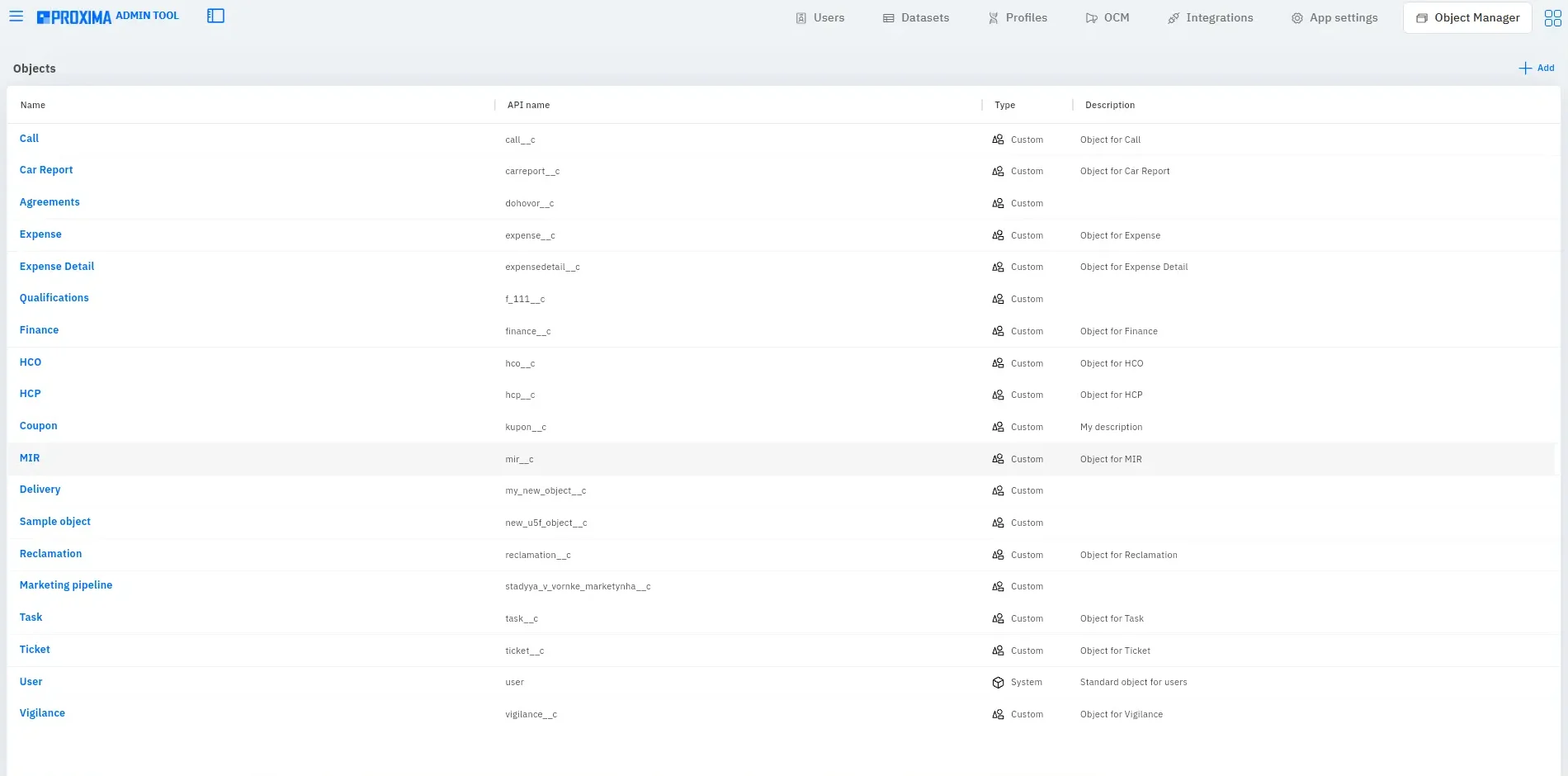
Object Manager. Proxima Admin Tool
Screenshot 1. Object Manager in Proxima Admin Tool. In the Object Manager section, the administrator can see the list of CRM objects: both system and custom objects. For each object, the table displays the columns Name, API name, Type, and Description. A new custom object can be created using the Add button.
My New Objects. Proxima Admin Tool
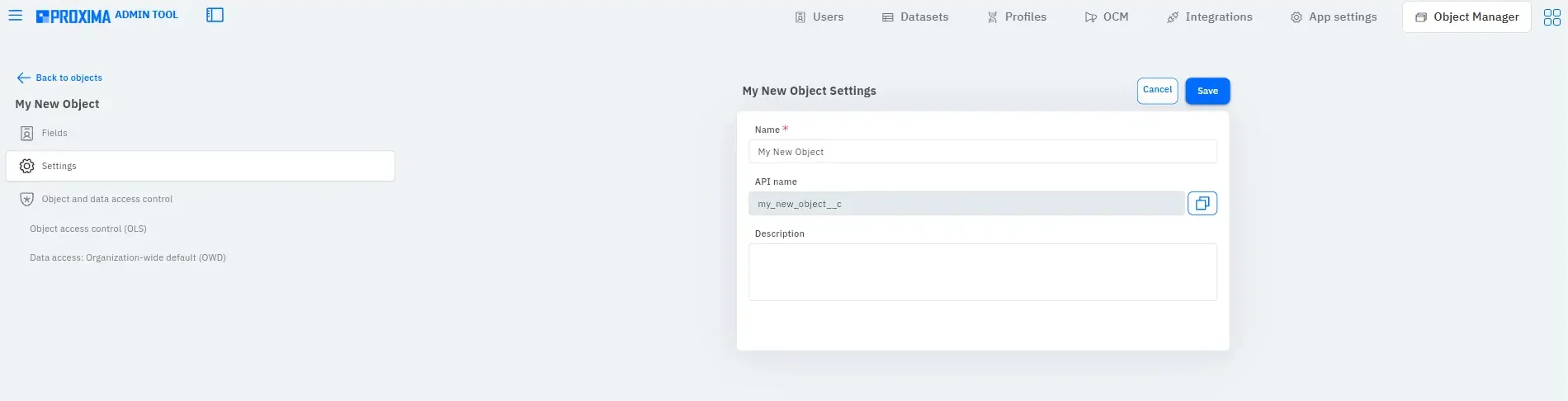
Screenshot 2. New Custom Object Settings. On the My New Object Settings screen, the administrator defines the name of the new object, reviews the automatically generated API name, and can add a description. The left menu shows the main configuration stages: fields, general settings, object access control, and data access.
My New Objects. Proxima Admin Tool
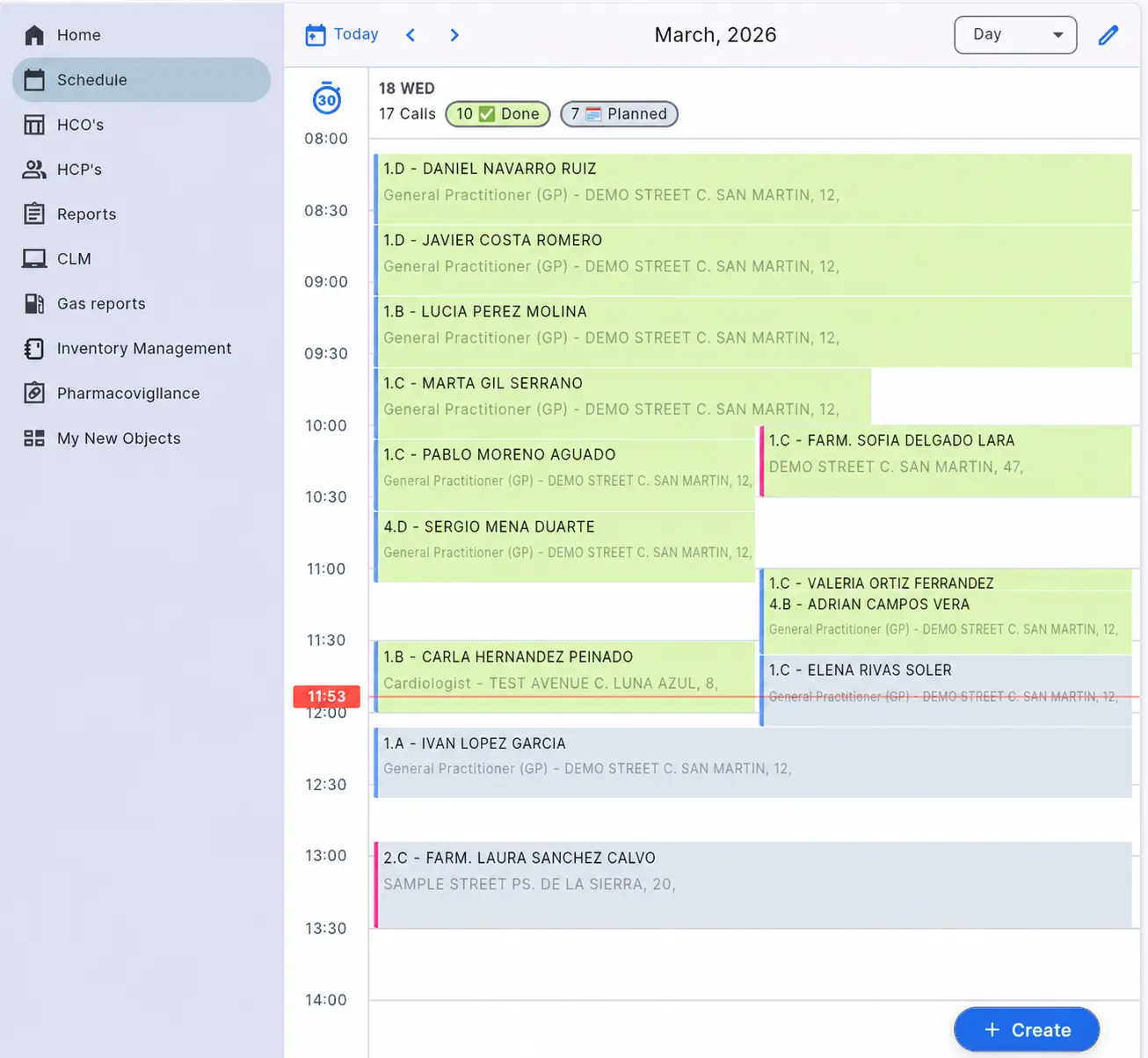
Screenshot 3. Displaying a Custom Object in the CRM Workspace. After configuration, the custom object can be displayed in the user workspace menu, for example as My New Objects. This shows that the created object can be available not only in the administrative area, but also in users’ daily CRM work.
Fields& Field-level security
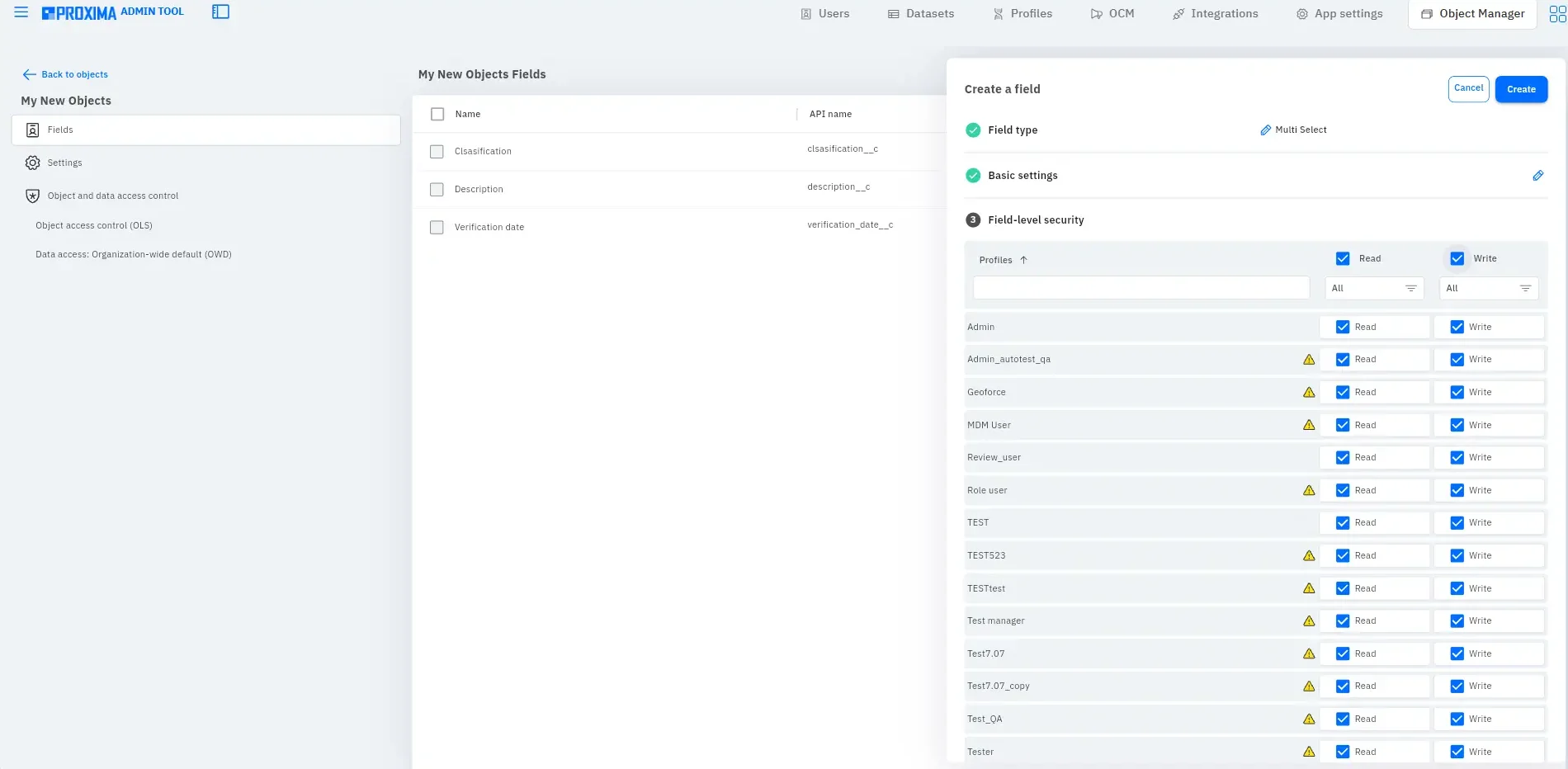
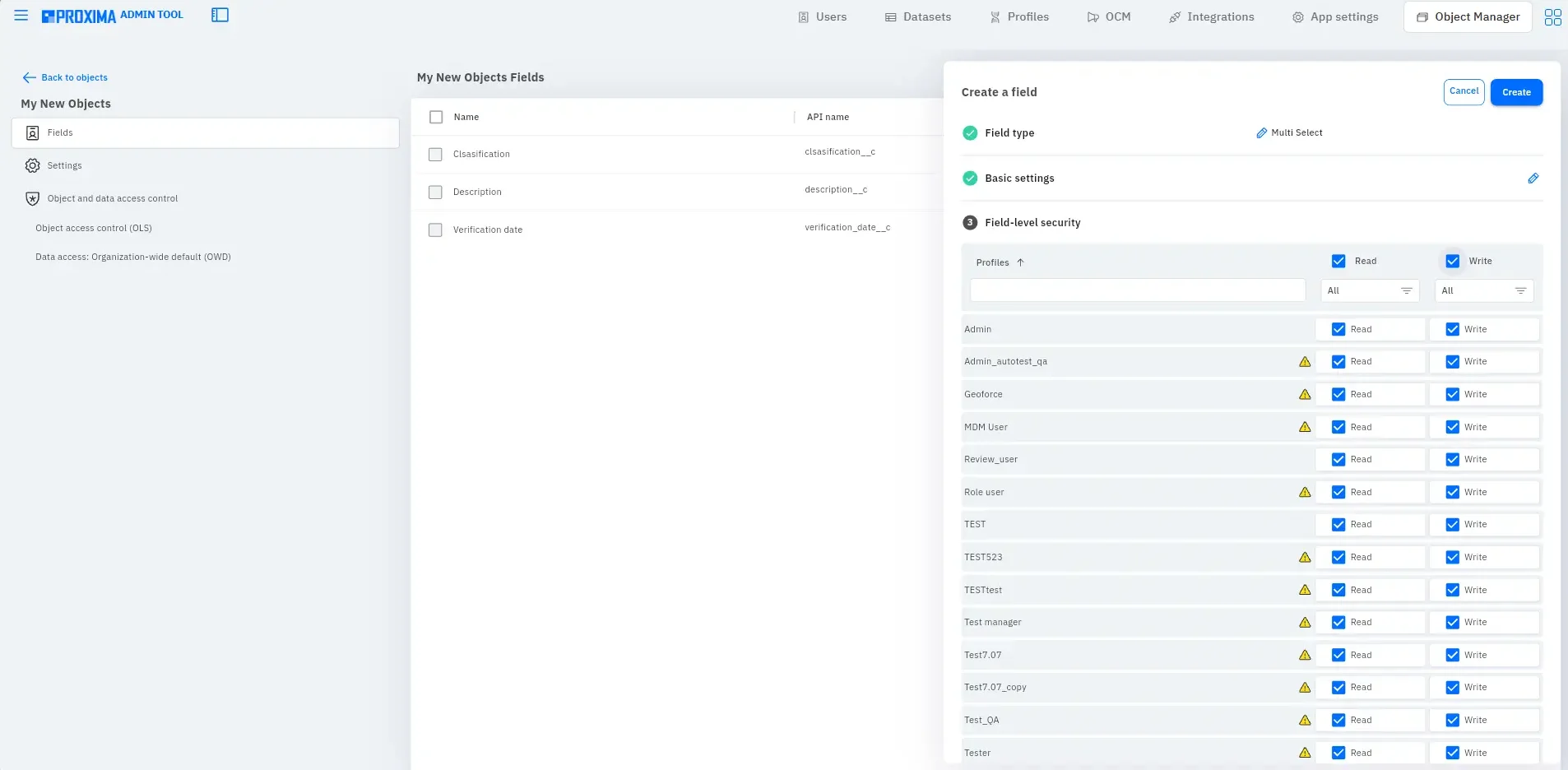
Screenshot 4. Custom Object Fields and Field-Level Security Settings. In the Fields section, the administrator sees the created fields of the custom object, for example Classification, Description, and Verification date. On the right side, a new field configuration panel is opened with the Multi Select type selected and the Field-level security block, where field access rights are defined for different profiles.
Custom object type. Proxima Admin Tool
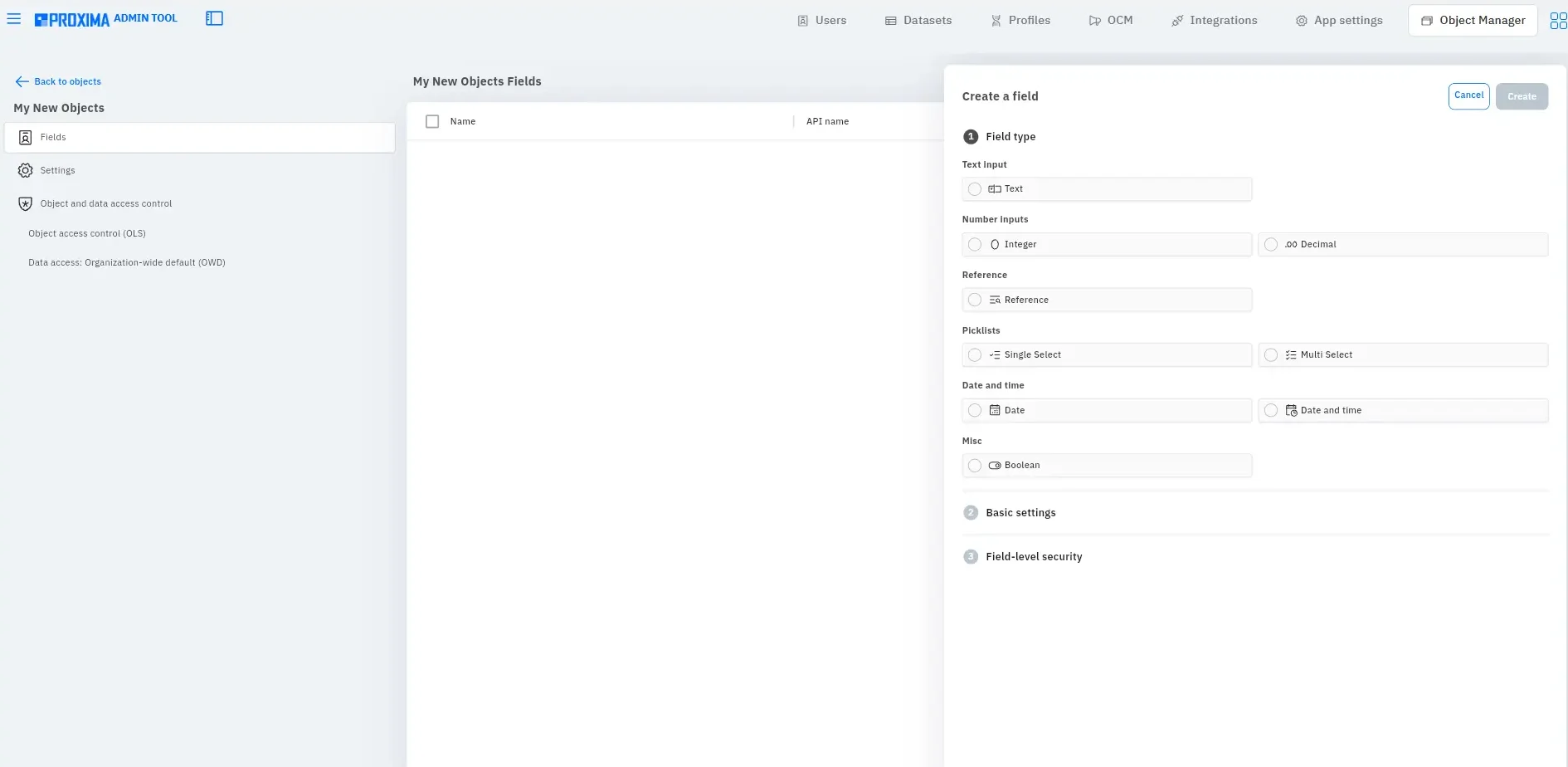
Screenshot 5. Selecting a Field Type for a Custom Object. At the first stage of creating a field, the administrator selects the data type. Available field types include text fields, number fields, reference fields, single select and multi select, date, date and time, and boolean.

Reference fields allow the custom object to be connected with other objects in the system and help build logical relationships between entities. This makes it possible to configure the structure of the custom object according to a specific business process.

Configuring field access for user profiles. Proxima Admin Tool
Screenshot 6. Configuring Field Access for User Profiles. At the Field-level security stage, the administrator defines which user profiles can read or edit a specific field. Read and Write permissions are configured separately, allowing control over access to sensitive or service data.
Data access: Organization-wide default (OWD). Proxima Admin Tool
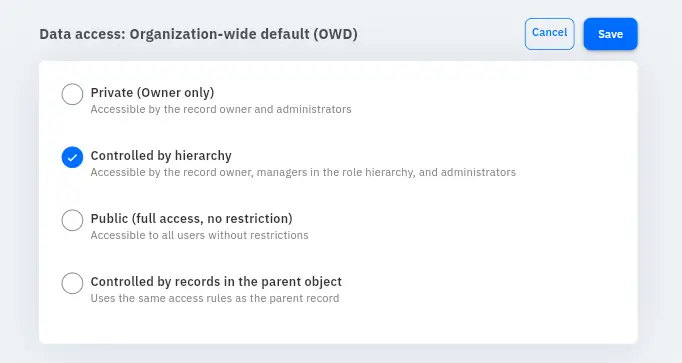
Screenshot 7. Data Access: Organization-Wide Default (OWD). In the Data access: Organization-wide default (OWD) section, the general access model for object records is configured. Access can be private, controlled by hierarchy, public, or controlled by access to records in the parent object. This helps define who can see custom object records across the organization.
Object access control (OLS). Proxima Admin Tool
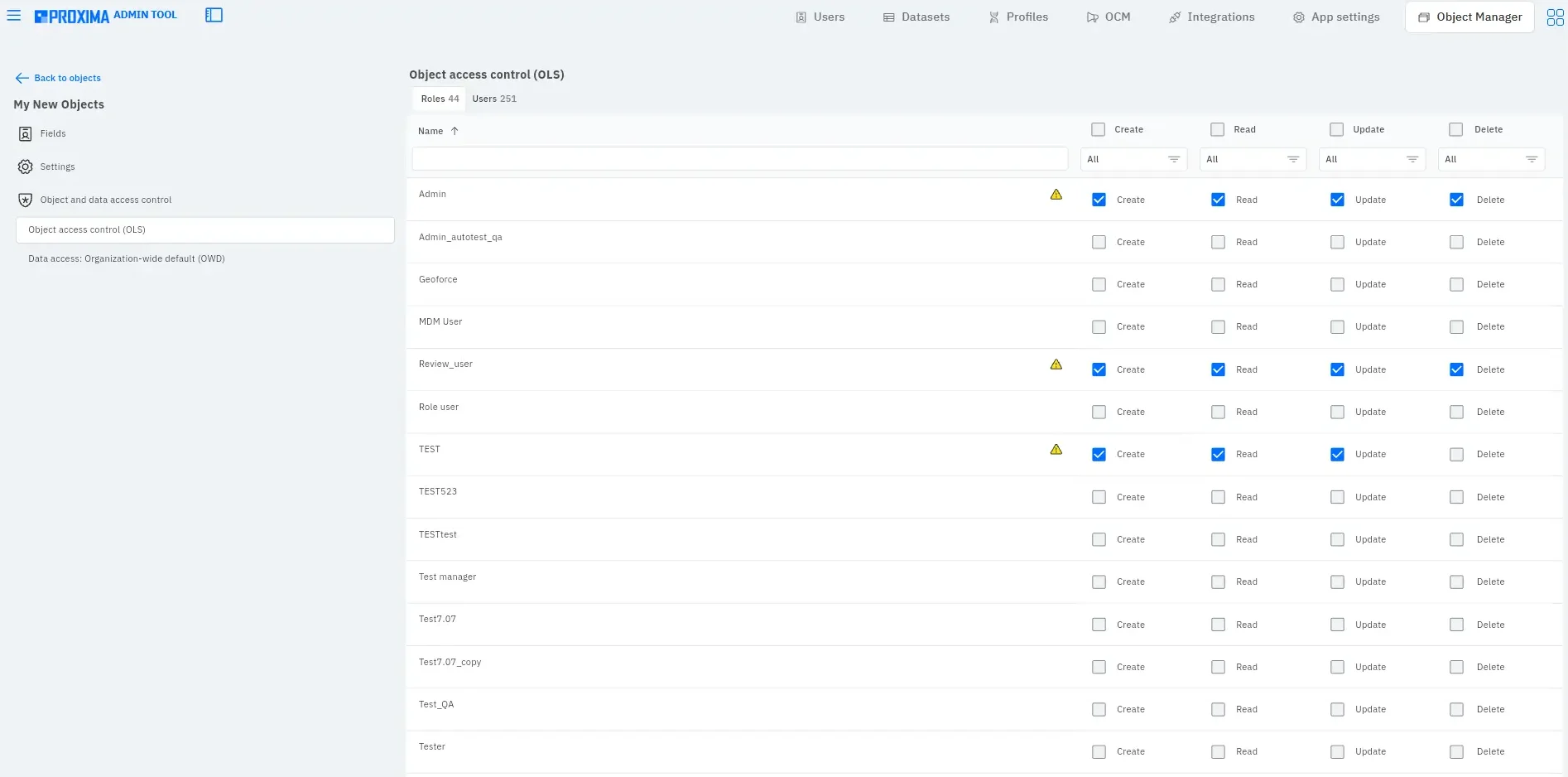
Screenshot 8. Object Access Control (OLS). In the Object access control (OLS) section, the administrator configures access rights to the object itself for roles and users. Create, Read, Update, and Delete permissions are defined separately, making it possible to flexibly manage who can create, view, modify, or delete records of the custom object.
Basic settings for a new field. Proxima Admin Tool
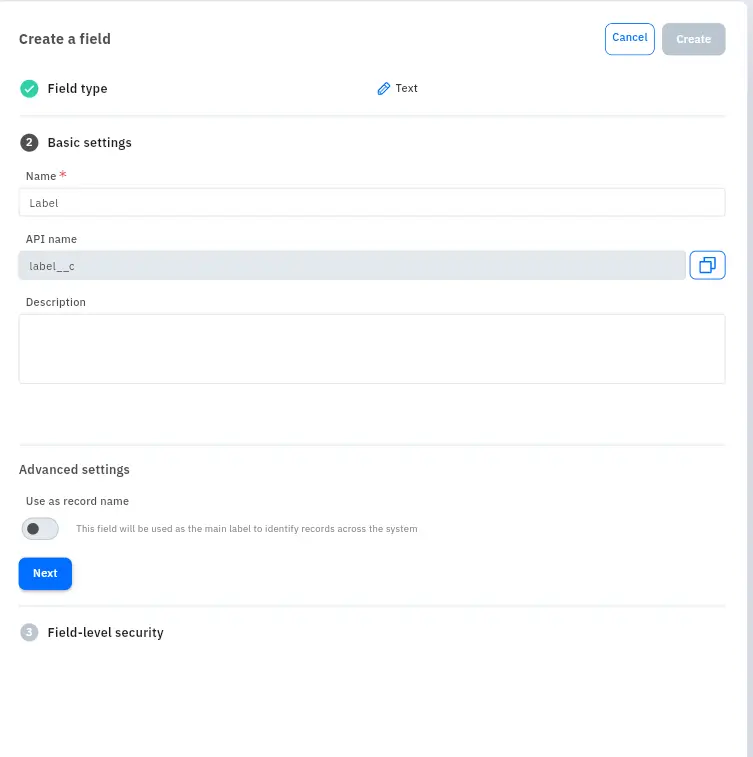
Screenshot 9. Basic Settings for a New Field. After selecting the field type, the administrator proceeds to Basic settings: defines the field name, reviews the automatically generated API name, adds a description, and can activate the Use as record name option. This option allows the field to be used as the main record name for identifying records across the system.

In Proxima Cloud CRM, custom objects are created as part of a managed customization model. An administrator can work with the Custom Objects builder, configure custom object settings, manage fields, access rights, and data visibility through Proxima Cloud CRM Object Manager.

This allows pharmaceutical companies to create their own entities for specific business processes without losing control over CRM architecture, data quality, and the role-based access model.

Custom Objects in BI Reports in Proxima Cloud CRM

Custom objects in Proxima Cloud CRM can be used not only in operational CRM workflows, but also in reporting. When a company creates its own entities for specific business processes, this data can be included in BI analytics and used to build custom reports and dashboards.

This is especially important for pharmaceutical companies that need to analyze not only standard CRM data, but also specific processes: field team activities, internal requests, custom classifications, local marketing initiatives, additional objects for HCP/HCO, or other user-defined entities. This approach turns CRM customization into a source of more accurate management data.

Custom objects in BI reports in Proxima Cloud CRM
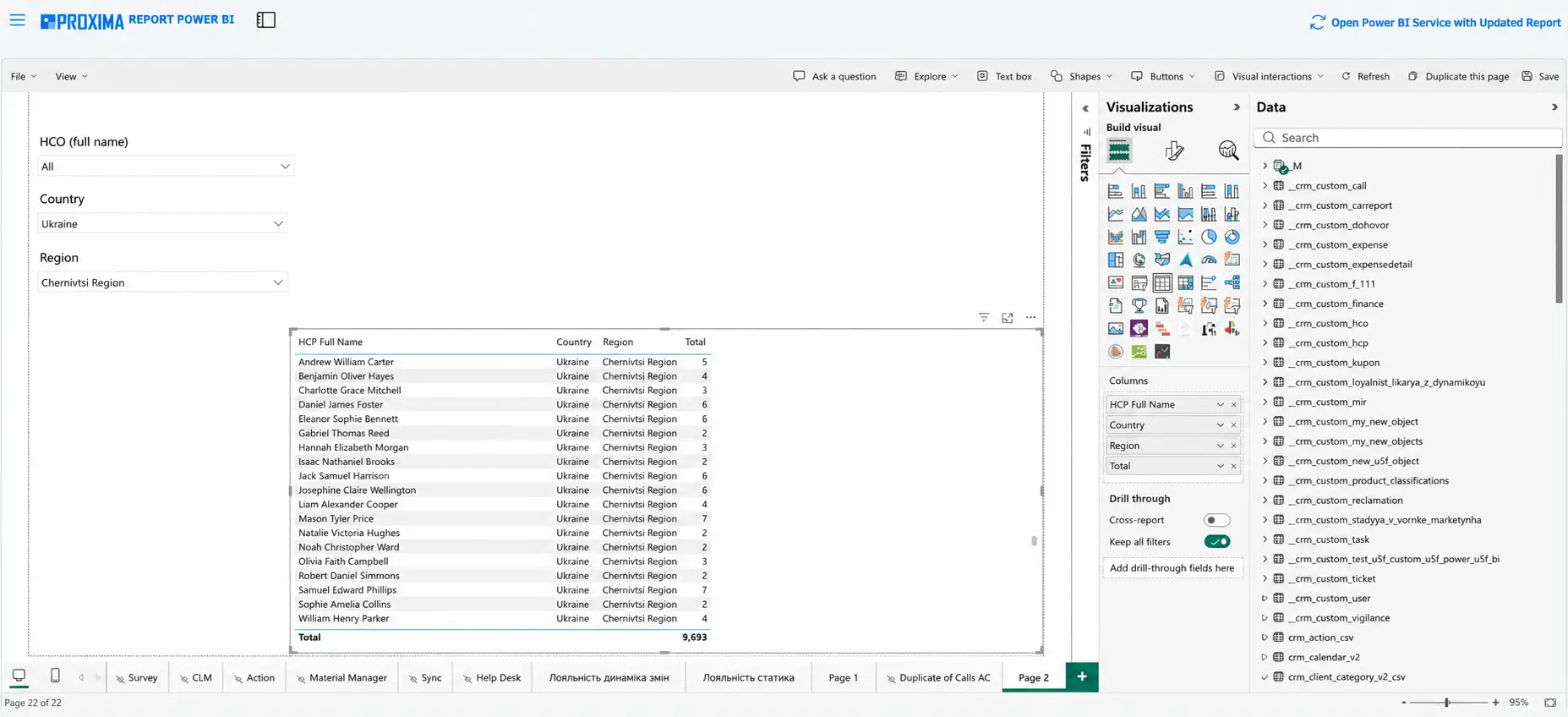
Screenshot 10. Custom Objects in BI Reports. In the BI report editor, an administrator or analyst can create a custom dashboard, select the required visualization types in the Visualizations panel, and choose datasets in the Data panel, including user-created custom objects with the crm_custom_ prefix.

This shows that data from custom objects can be used to build reports, filters, tables, and visualizations according to the needs of a pharmaceutical company.

Why This Approach Matters for Pharmaceutical Companies

In the pharmaceutical industry, it’s not enough to simply create a new field or a new table. Any new object must be understandable to all users, controlled at the access level, and suitable for use in reports and data visualizations by executives and managers. That is why in Proxima Cloud CRM, creating a custom object is combined with configuring fields, access levels to fields, access to the object itself, and the overall visibility model for records.

This allows administrators not only to add a new entity to CRM, but also to immediately define its place in the system: who can work with it, which data each role can see, which fields may be service or sensitive fields, and how the created object will be used in a real business process. 

For field teams, this means more accurate work with data. For administrators, it means more independence without the need to involve developers every time. For management, it means better data structure and the ability to scale CRM without losing control. 

Territory Manager in Proxima Cloud CRM as the Next Step in Managed Customization

A separate development area of Proxima Cloud CRM is Territory Manager — functionality for flexible management of field team territories.

We will not describe this area as a direct continuation of the Custom Objects builder, but it is logically connected with CRM customization. If custom objects help a company create its own entities for business processes, Territory Manager develops another important level of flexibility: the ability to independently build a territorial model, assign users, connect HCP/HCO records to territories, and manage data visibility.

For pharmaceutical companies, territory management is a key operational function. Territory often determines which physicians and healthcare organizations are assigned to a specific medical representative, who is responsible for a particular market segment, and which data the user can access.

That is why the development of Territory Manager continues the same logic as custom objects: CRM should not impose a rigid structure on the company, but should allow it to model its real organizational logic in a controlled way.

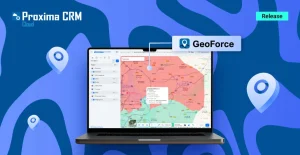
In the product roadmap, Territory Manager is expected to give clients more independence in managing field team structures: from building territory hierarchies of any depth to assigning users, linking HCP/HCO records to territories, integrating with GeoForce, migrating geographic polygons into a unified territory model, mass import/export, and automatically filling territories based on filtering logic.

For pharmaceutical business, this is an important step in the same direction as custom objects: CRM becomes more adaptable to the real organizational structure of the company while preserving control, access transparency, and data integrity.

How Territory Manager Complements the Logic of Custom Objects

Custom objects answer the question: which additional entities does the company need to accurately describe its business processes? Territory Manager answers another, but related, question: how to organize responsibility, visibility, and access to HCP/HCO data according to the territorial structure of the field team.

Together, these areas form a more mature approach to CRM customization. The company receives not just a set of separate settings, but the ability to build a managed operating model: its own objects, its own field structure, its own access model, its own territory logic, and future integration with geographic data.

This is especially important for enterprise clients with distributed field teams. Such companies often have seasonal territory changes, overlapping responsibility zones, separate rules for working with KOLs, different management levels, and different data visibility scenarios. If CRM does not support this structure natively, the company has to use workarounds or request custom development. The development of Territory Manager is intended to reduce this dependency and move a typical pharmaceutical business need into platform functionality.

Conclusion

Custom objects in Proxima Cloud CRM are a practical tool for managed flexibility. They allow administrators to create new entities, configure fields, define access rights, control data visibility, and adapt CRM to specific business processes of a pharmaceutical company.

At the same time, the value of custom objects lies not only in the fact that they can be created. What matters is that they work within the administrative logic of Proxima Cloud CRM: through Object Manager, API name, Field-level security, Object access control, and Organization-wide default. This helps prevent customization from turning into chaotic accumulation of additional entities and helps maintain order in the CRM structure

A separate advantage of this approach is the ability to use custom objects not only in CRM processes, but also in BI reports. This allows pharmaceutical companies to build custom analytics based on user-created entities and better connect operational data with management decisions.

Further product development, including Territory Manager, shows that Proxima Cloud CRM is moving not only toward separate custom settings, but toward a deeper model of managed customization. This means the ability to model complex business structures: territories, hierarchies, HCP/HCO links, user responsibility, data visibility, integration with GeoForce, and future automation of territory filling.

For pharmaceutical business, this approach is a strategic advantage. Proxima Cloud CRM gives companies more independence in adapting the system while preserving control, transparency, role-based security, and data integrity. This balance between flexibility and order defines the value of modern pharma CRM: the system should develop together with the business without losing manageability.

Ready to try Proxima Cloud CRM in action?

Create your own objects, evaluate the convenience of territory management in Territory Manager, and discover more Proxima Cloud CRM capabilities for your pharmaceutical team.

Contact us to schedule a platform presentation or request a free demo.


Note: The material uses screenshots from a demonstration environment with depersonalized or simulated data that does not belong to real individuals.

Would you like to be contacted, learn more about our product, or receive personalized advice?

Хотите, чтобы с вами связались, узнать больше о продукте или получить персональную консультацию?

Бажаєте, щоб з вами зв’язалися, дізнатися більше про продукт або отримати персональну консультацію?

¿Le gustaría que le contactaran, conocer más sobre nuestro producto o recibir asesoría personalizada?

Gostaria de ser contatado, saber mais sobre nosso produto ou receber uma consultoria personalizada?

BLOG

Related articles

Кейс Proxima Cloud CRM: GeoForce для управління територіями у фармацевтичній компанії GSK | GSK case study: GeoForce for territory management in a pharmaceutical company

GSK Ukraine

Proxima Cloud CRM Success Stories: GSK Ukraine. Country: Ukraine GSK is one of the leading

Read More

Запросіть демонстрацію функцій Proxima Cloud CRM

Залиште свої дані, щоб дізнатися, як це працює
Будь ласка, введіть коректне ім'я (не лише цифри).
Використовуйте коректну корпоративну адресу пошти.
Введіть коректний номер телефону.

Request a Demo of Proxima Cloud CRM Features

Leave Your Details to See How It Works
Please enter a valid name (not just digits).
Please use a valid corporate email address.
Please enter a valid phone number.

Unlock your free PDF

Choosing a CRM? Avoid These 7 Mistakes

Download our ultimate CRM checklist