


In March 2026, Proxima Cloud CRM introduced Release 14 along with the minor update 14.1, delivering significant improvements across four key areas of the ecosystem: enhanced mobile application stability and automation for field teams, simplified mass role management for platform administrators, increased transparency and advanced analytics for territory management in GeoForce, and expanded reporting capabilities in Power BI.
We have prepared a complete overview of our product updates. Follow the releases on the blog – we publish on a regular basis.
Content
Infographics. Release v.14
Key highlights. Release v.14
- Extended Surveys functionality by introducing score validation.
- Added the ability to view SCE communications in visit history.
- Enhanced Cycle Plan with support for workdays.
- Separate field for surveys was introduced in the visit card, and MDM visit data arrives in CRM automatically.
- GeoForce gains territory authorship tracking and a distance measurement tool.
- Power BI adds competency and fuel expense reports for field force managers.
Short overview. Release v.14
This release places a strong focus on reducing manual data entry and improving synchronization reliability in the mobile application, while also enabling automatic transfer of visit data from external systems such as the MDM API. At the same time, administrators benefit from streamlined role management through Excel-based import/export, automated validation, and bulk policy application.
GeoForce enhancements bring greater visibility into territory changes with authorship tracking, distance measurement tools, and hierarchical data aggregation, allowing more precise planning and control. In parallel, Power BI dashboards have been extended with new reports, including employee competency tracking and fuel expense monitoring, providing deeper insights for field force managers and regional leaders.
The minor release 14.1 further strengthens system performance and scalability, introducing faster batch processing, improved hierarchy management for large organizations, and uninterrupted access to Power BI reports during active sessions.
Proxima Cloud CRM Mobile Application
The primary focus of this release is to enhance mobile application stability and automate external activity reporting, reducing manual data entry and ensuring more reliable synchronization. These improvements streamline workflows for field teams, allowing them to focus more on high-value tasks and less on administrative overhead.
New Features in the App
- Automatic Visit Transfer from MDM API
Proxims Cloud CRM now supports automatic transfer of visits from the MDM API. Remote Visits results created or updated in MDM are automatically delivered and registered in CRM without manual import or additional actions. - HCP Schedule
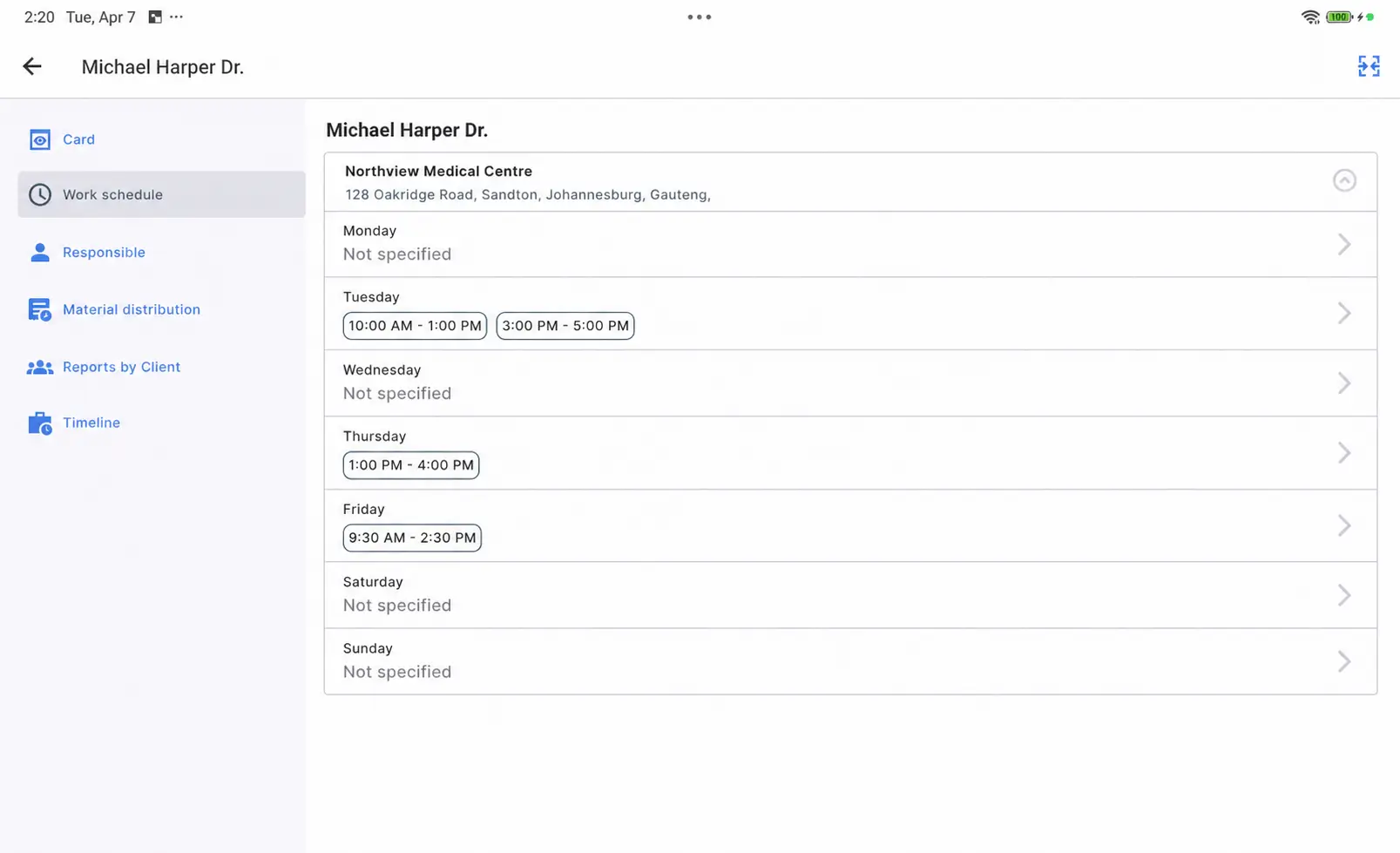
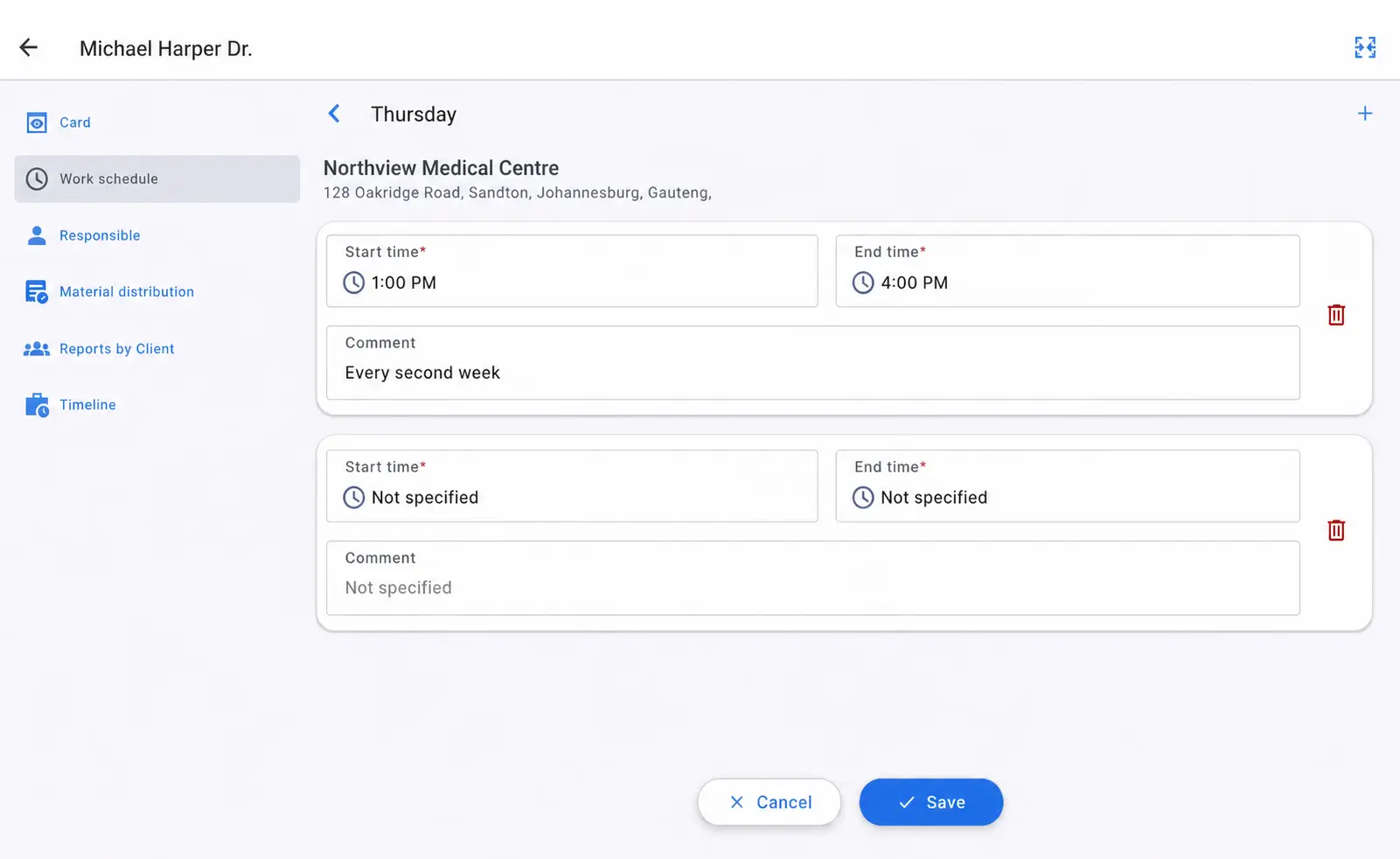
You can now edit the doctor’s availability details (time slots); this is necessary for accurate scheduling and improving the quality of future appointments
- Google Maps Integration
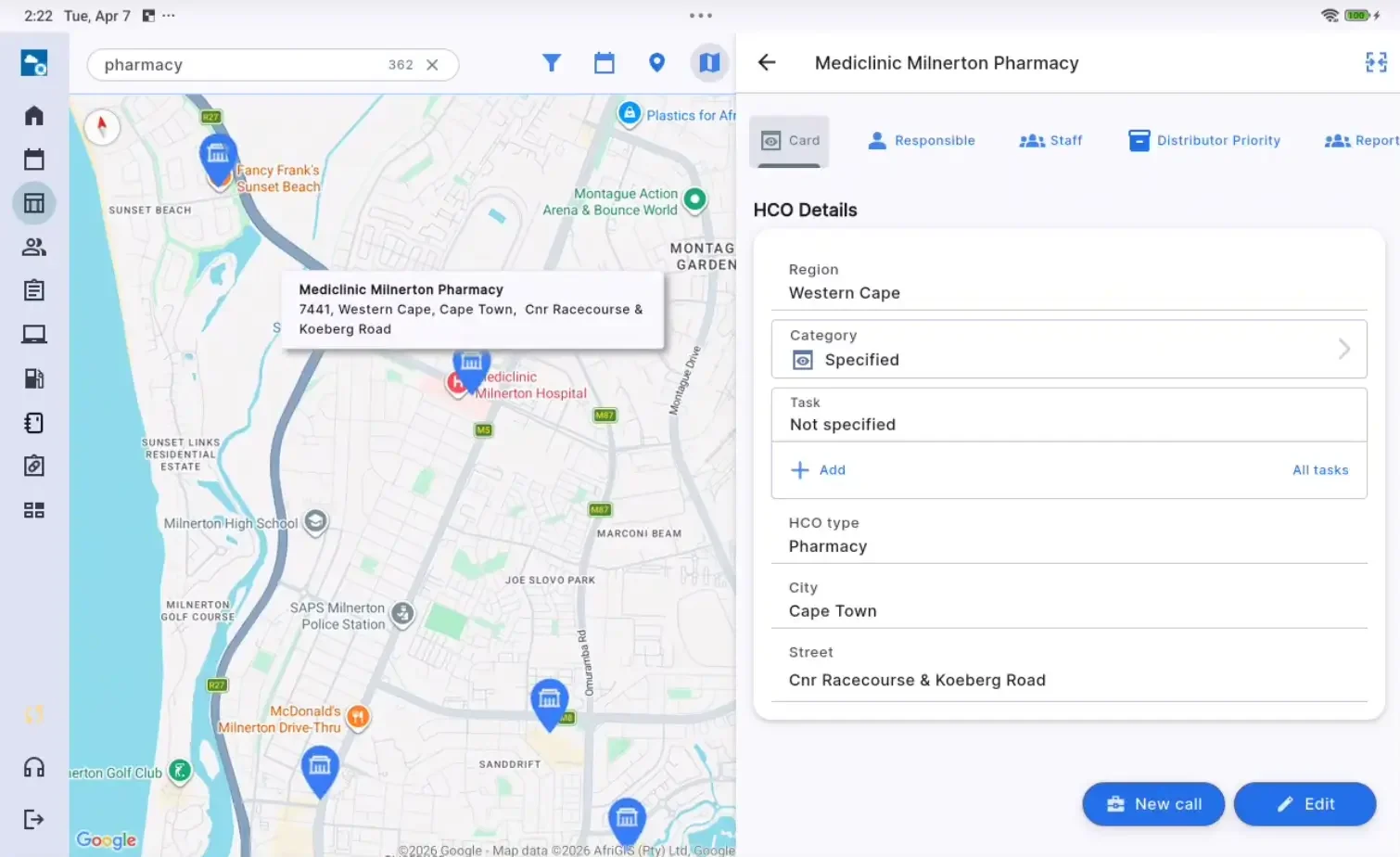
The mobile application now uses Google Maps instead of OpenStreetMap as the map provider.
- Cycle Plan Workday Field
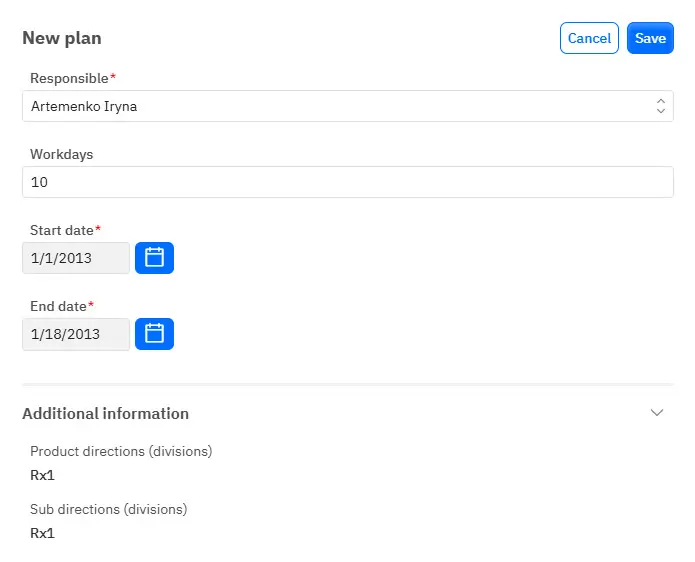
Cycle Plan now includes a Workday field that stores the number of working days.
- Survey Fields Separation in Visit Card
Survey fields in the visit card are now divided into main and additional sections. - Survey Score Validation
Survey Manager now allows questions to participate in score calculation. A minimum score threshold can be configured. If the result is below the defined threshold, the user must select a reason from a predefined dictionary. - Communication History Enhancement
The Communication History tab now displays SCE communications together with visits and OCM communications. - Extended Date Import Support
External data import now supports explicit YYYY, MM, and DD tokens, including partial date formats. - Sync Merge Optimization for Flutter Clients
The synchronization merge process in Flutter clients has been optimized, improving sync performance when working with large data volumes. - Large Dataset Import Optimization
Dataset import performance has been improved. Files are now processed more reliably with fewer timeouts and memory errors. In most cases, splitting files before import is no longer required.
Proxima Cloud CRM Platform
We’ve simplified mass administrative operations and enhanced the configuration of access rights, allowing administrators to manage complex role structures with ease. Now, using Excel, administrators can quickly import, validate, and detect errors in role configurations, streamlining the process while minimizing the risk of mistakes. This upgrade significantly reduces manual effort and increases operational efficiency for large organizations.
New Features on the CRM Platform
- Data Export
The complete role structure can now be exported in a flat Excel format with a single click. - Flexible Import
Administrators can import multiple roles simultaneously using the standard workflow: file upload → validation → processing. - Error Protection
The system automatically checks imported data for circular dependencies (loops) in role structures. - Automatic Warnings
The system analyzes access rights configuration and warns about logical conflicts, for example when Field-Level Security (FLS) is granted without Object-Level Security (OLS). - Visual Indication
Warning icons are displayed next to profiles and provide clear explanations of configuration issues and recommended fixes. - Bulk Policy Application
Access policies for Object-Level Security (OLS) and Field-Level Security (FLS) can now be applied across all Profiles simultaneously, eliminating the need to configure each profile individually.
Enhancement Platform
- Full Platform Synchronization (User Management)
Personnel management mechanisms were updated to comply with the new Platform requirements. - Updated Templates
Import, export, and mass update templates now include all fields available in the user creation card. - On-the-Fly Role Assignment
During user import, administrators can specify names of existing roles. These roles will be automatically assigned when the user record is created. - Expanded Export
User data exports now fully reflect the current Platform data and match the information displayed in profile view mode. - Custom Field Copy in Standard Objects in Web Application
Users can now copy custom field values within standard objects directly in the web interface, reducing manual data re-entry when working with similar records.
GeoForce
This release improves transparency around territory changes, making it easier for administrators to track modifications and manage assignments. It also enhances analytical capabilities for hierarchical structures, allowing for better data aggregation and decision-making. Additionally, the strengthened integration with Proxima Cloud CRM’s responsibility management ensures more seamless coordination across teams and more accurate reporting on territory performance.
New Features for Territory Management
- Territory Change Tracking
Brick tooltips now display information about the user who last edited the territory, allowing administrators to track territory modifications more easily. - Distance Measurement Tool
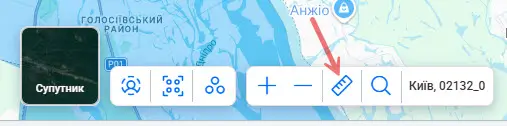
A new “Ruler” tool is available on the map, enabling users to measure distances between points or along routes. This helps estimate coverage areas, travel distances, and proximity between objects directly within the interface.
- Hierarchical Data Aggregation
For hierarchical structures, parent elements can now automatically display aggregated values from their subordinate elements, allowing totals and rollups to be viewed without manual calculations. - Controlled Multi-Version API Usage
Multi-version API mode is now controlled through a configuration setting, allowing administrators to enable or disable multi-version usage depending on system requirements. - Automatic Responsibility Cleanup
When a territory is reduced, responsibilities associated with the removed area are automatically deleted from CRM, ensuring consistency between territory configuration and CRM assignments. - Extended Territory Export Data
Territory exports now include an “organization type” field, allowing external reports and analytics to differentiate between organization types directly in the exported dataset. - Technical changelog: Controlled Multi-Version API Usage
Multi-version API mode is now controlled through a configuration setting, allowing administrators to enable or disable multi-version usage depending on system requirements.
New Reports in Power BI
This release extends Proxima Cloud CRM Analytics Basic with advanced reporting capabilities designed for field force managers and regional heads. Two new report groups have been added: competency tracking for double calls analysis, providing deeper insights into representative performance, and an operational cost monitoring tool through the new Fuel Report, enabling better control over field team expenses. These enhancements empower managers to make data-driven decisions that optimize team effectiveness and cost-efficiency.
- Employee Competency Overview
Provides visibility into the development of medical representatives’ competencies over time and enables quick comparison of employee performance across the team. - Dynamic Competency Ratings
Offers deeper insights into competency changes based on recent interactions with healthcare professionals, helping identify positive or negative performance trends. - Double Calls Detailed Table
Allows detailed analysis of competency evaluations for individual visits, helping managers better understand performance drivers and make more informed decisions.
New. Fuel Report — Streamlined Monitoring of Vehicle Usage and Expenses
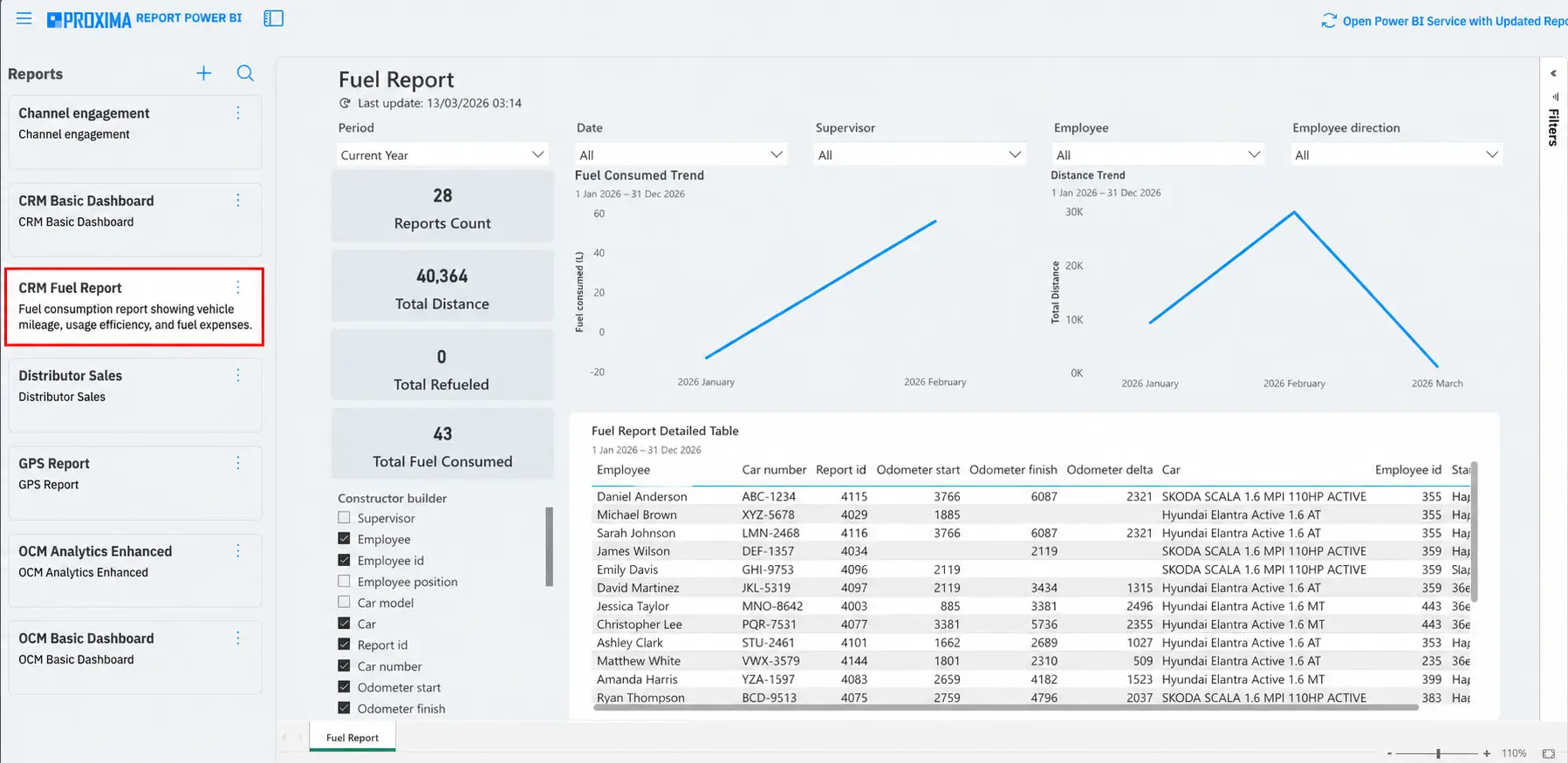
The Fuel Report provides centralized visibility into vehicle usage and fuel expenses, offering detailed insights into mileage, refueling events, and activity data for the selected period.
This feature enhances operational monitoring, enabling managers to track fuel consumption trends and identify potential areas for cost savings. It also supports more detailed analytical reporting, helping to optimize fleet management and improve overall operational efficiency.
Proxima Cloud CRM v.14.1: Major Enhancements to Performance and Security
Minor release v.14.1 has been successfully deployed to all client environments on March 24, 2026. This update focuses on system stability and performance improvements for large-scale data operations.
Beyond UI bug fixes, we have completed a major internal modernization: upgraded the Routes service architecture, integrated a new security system, and accelerated background processing for mass data updates (Batch operations) by tenfold!
Infographics. Release v.14.1
Optimized Hierarchy Management: Speed and Accuracy for Large-Scale Admin Tasks
We have significantly optimized role and user list management for large organizations (1,000+ records):
- Near-Instant Saving
Hierarchy changes now save up to 6× faster. Even with 1,400+ records, the process completes in under 5 seconds, down from 30+.
- Process Transparency
A visual loading indicator now confirms the system is processing your request, eliminating any uncertainty after clicking.
- Duplicate Prevention
The “Save” button automatically locks after the first click until the operation completes, preventing accidental duplicate entries.
Enhanced Power BI Integration: Real-Time Token Refresh for Uninterrupted Access
Now remain fully accessible throughout your working session without requiring a manual page refresh or re-login.
Previously, Power BI report sessions could expire mid-use, interrupting your workflow. This has been resolved.
The underlying mechanism ensures you always receive a valid, fresh token – the previous token is already replaced before it expires.
Summary
Proxima Cloud CRM launched Release 14 and the minor update 14.1, bringing key improvements to system performance and user experience. The release enhances mobile app stability, automates external activity reporting, and improves synchronization for field teams. Administrators benefit from streamlined role management with Excel-based import/export, automated validation, and error detection. GeoForce’s territory management now includes better transparency and advanced analytics. Power BI reporting is expanded with new dashboards for competency tracking and operational cost monitoring, including the new Fuel Report.
Overall, these updates streamline workflows, enhance decision-making, and improve operational efficiency for field teams and platform administrators alike.
Want to learn how Release v.14 and v.14.1 updates can work in your business processes?
Fill out the feedback form and we will show you the new features of Proxima Cloud CRM, GeoForce, and other Proxima Research products in practice.
Note: The material uses screenshots from a demonstration environment with depersonalized or simulated data that does not belong to real individuals.